

POM Costing
Costing & post-calculation
Costing schemes with your formulas: material, labour, machine rates, scales and scenarios – every figure with its derivation, plus post-calculation.
+49 € / month net with 1 user
Online demo first, then a 30-day trial
- 01
The problem
Quotes come from a spreadsheet only one person understands. Whether an order earned money is unknown.
- 02
How POM solves it
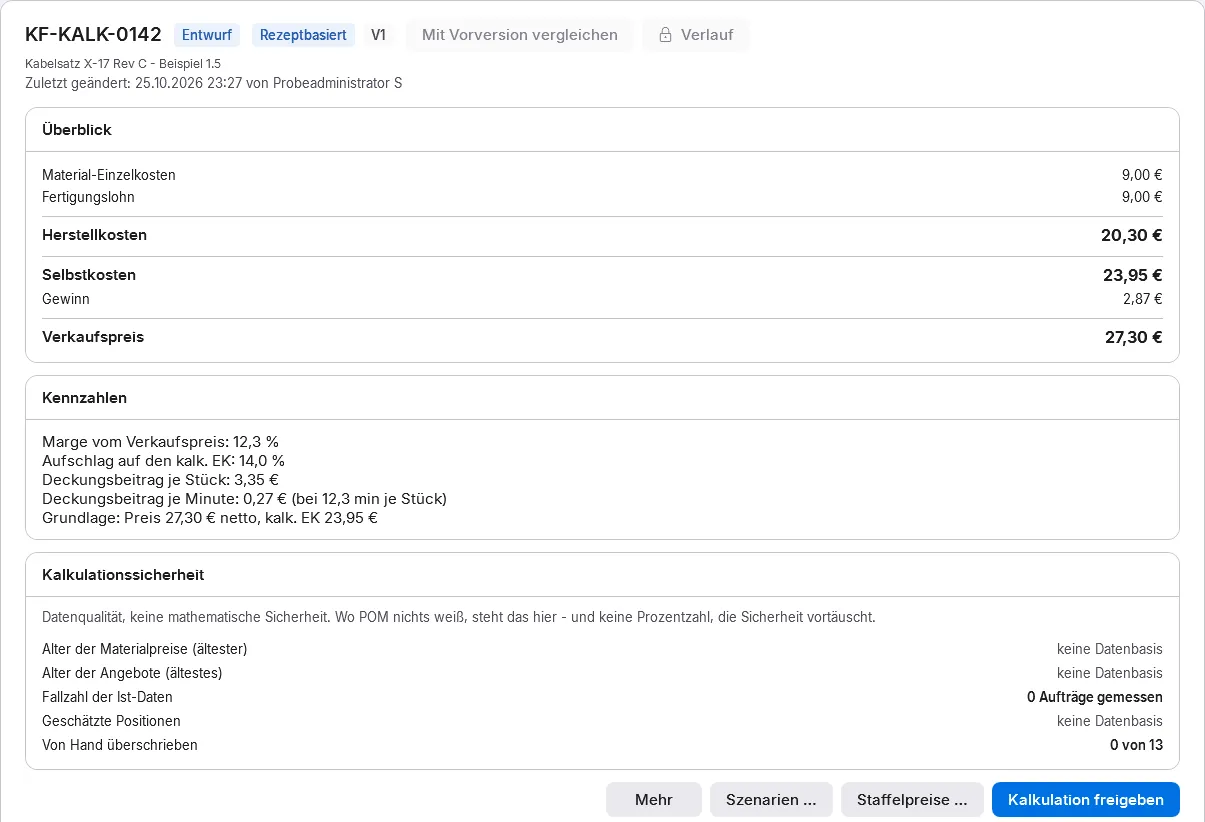
You design schemes with lines, variables and formulas freely. There are cost rates for employee, machine and cell – a missing rate is an error, not zero. The released version flows into the quote. Post-calculation compares plan with actual and shows how reliable a costing is.
- 03
The result
Quotes with a foundation – and per-order profit that is knowledge instead of feeling.
Functions
What is inside.
-
Costing schemes with lines, variables and formulas (surcharge, machine hour rate, contribution margin); factory templates
-
Every figure with its derivation, “Why this price?” in the sales document
-
Cost rates for employee, machine and cell
-
Operations with separate machine and labour times, set-up time spread over the lot size
-
Quantity scales; material with purchase prices, packaging unit and minimum quantity
-
Scenarios, target price and reverse costing – from which quantity?
-
Versions and release; collective costing per price list with “valid from”
-
Post-calculation plan versus actual with case count; costing reliability in five criteria
-
A new target time is suggested only from five feedback records – and adopted only after confirmation
-
Margin per article and customer with its history; the margin watch leads to a new costing version and prices “valid from”
-
“Why does this article cost so much?”: the costs of an article with their derivation
- Roadmap
No date yet: drill-down of the derivation across several levels
How it fits together
Every module feeds the next.
Receives
- POM Sales & CRM Request a costing straight from the enquiry, as a task with a deadline
- POM Warenwirtschaft (ERP) Landed costs from supplier invoices flow into costing and margin
- POM Shop Floor Data Actual times for post-calculation, plan versus actual; from five confirmations a target-time proposal
Passes on
- POM Warenwirtschaft (ERP) Approved costing as the price source in the quote, prices taken over into price lists
Price
Concurrent users count, not accounts.
Module, booked individually 10 % saving with annual billing
| POM Costing | with 1user | with 5users | with 10users | with 20users | with 50users | more than 100users |
|---|---|---|---|---|---|---|
| net / month | +49 € | +225.40 € | +421.40 € | +764.40 € | +1,646.40 € | On request |
| net / month, annual billing | +44.10 € | +202.86 € | +379.26 € | +687.96 € | +1,481.76 € |
Example amounts with the same number of users, net plus statutory VAT. Per module you book as many concurrent users as you need, at most as many as in the core. User accounts are unlimited.
More than 100 concurrent users: individual quotation, price on request. Request a quote
Quick answers
Questions about POM Costing
What is the difference between costing and post-calculation?
Costing works out before the order what an article costs and which price follows, according to your scheme with material, labour, machine and surcharges. Post-calculation then compares plan and actual. POM Costing does both and shows costing reliability in five criteria.
Can I work out from which quantity a target price is reached?
Yes. Scenarios, target price and reverse costing answer from which quantity a price holds. Set-up time is spread over the lot size, and for material the packaging unit and minimum quantity count.
Does POM adopt actual times as new target times automatically?
No. POM suggests a new target time only from five feedback records, and it is adopted only after confirmation. A missing cost rate is an error in POM, not zero, so no costing silently calculates with gaps.
Business
More modules in this group.
- Module
POM Warenwirtschaft (ERP)
Sales, purchasing and basic warehouse in one module: from quote to credit note, from purchase order to supplier invoice – with one process number.
+12 € / month net with 1 user Learn more - Module
POM Sales & CRM
The CRM in POM: leads, enquiries, opportunities and quote tracking – through to account development and forecast.
+39 € / month net with 1 user Learn more - Module
POM Accounting
Financial accounting in the same system as production: chart of accounts, journal, open items, payments, dunning, cash book, closing and DATEV.
+59 € / month net with 1 user Learn more - Module
POM Shops & Marketplaces
Take over orders from web shops, marketplaces, B2B portals and via EDI: checked and approved by a person. Basic level, special connections on request.
+59 € / month net with 1 user Learn more
POM in your industry
Where POM Costing matters most.
-
Machine building
Single units and small series, long procurement, many trades on one order.
Learn more -
Special vehicles
Project manufacturing with long build times and documentation the customer keeps for decades.
Learn more -
Contract manufacturing
Changing customers, changing parts – margins decided in the quote and defended on the floor.
Learn more
See POM for your business.
First we show you POM in an online demo with a sample company. After that you can test it for 30 days with a trial licence of your own.