ERP, planning and shop floor data for manufacturers
Complexity in.Control out.
POM combines ERP, CRM, production planning, shop floor data, quality and accounting in one system. And it guides: every morning, each person sees what is waiting for them, built inside a real manufacturing company.
30-day trial after the demo. First we show POM online.
POM – Production Operations Management
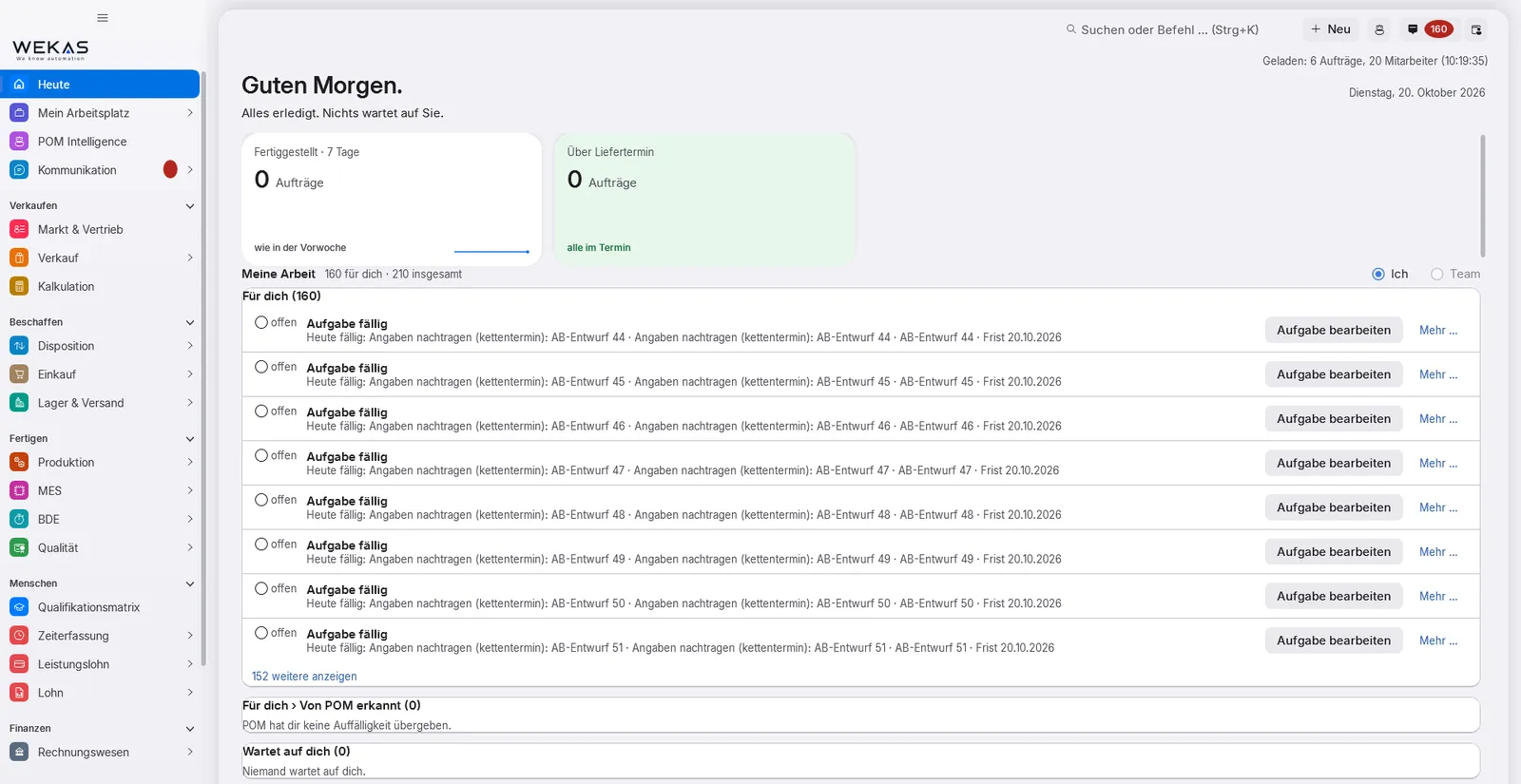
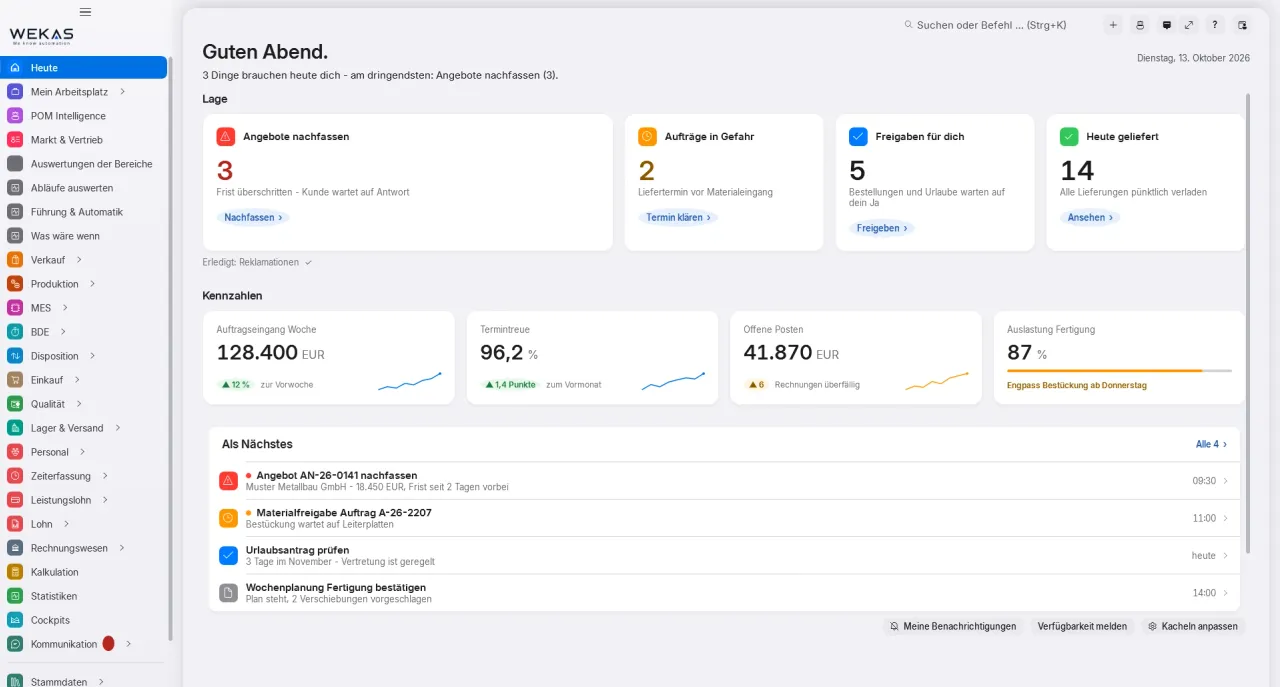
Actual POM interface, “Today” start page, sample data
One system instead of ten
Ten programs. Or one system.
In many manufacturing companies every department runs its own program: ERP, planning, shop floor data, CRM, quality, time recording, accounting, with interfaces, exports and spreadsheets in between. POM brings it all together: one database, one sign-in, no interfaces between departments.
Today: many programs
ERP
Planning
Shop floor data
CRM
Costing
Quality (CAQ)
Time recording
Accounting
Warehouse
Shipping
Reporting
Notes and e-mails
Interface
Export and import
Re-typing, notes, e-mail
Every program has its own state, its own master data and its own sign-in. What belongs together is linked by interfaces, exports or somebody types it in again.
Every department works on the same database. An order, an article, an employee exists exactly once, each department sees it from its own angle.
With many separate programsWith POM
×One order lives in several programs, each with its own state.One order, one process number, one state. Follow-up documents take over what has already been entered.
×Employees maintained separately in time recording, planning, shop floor data and the pay list.One employee record: time recording, absence, skills, piecework pay, shop floor data and planning all read the same person.
×Interfaces and exports that can break whenever one of the programs is updated.No interfaces between your own departments, every module works on the same database.
×Every program calculates its own key figures and none of them match.Every key figure is calculated once on the server; screen, cockpit and export read the same calculation.
×Many sign-ins, many permission systems, many contacts.One sign-in and one permission system: the server checks permission, module and company on every access.
×Invoices are exported or re-typed for accounting.Sales and purchasing documents are posted automatically in POM accounting.
You set the rules, POM guides within them: everyone sees what is waiting for them, and no hand-over gets lost between two departments.
POM – Production Operations Management
“Today” start page: your own tasks with deadline and direct entry. Sample data.
1What is waiting for me? My work · with deadline
2What am I waiting for? With purchasing · since yesterday
3Who is waiting for me? Waiting for you · 3 items
Today
Each person’s start page answers three questions: What is waiting for me? What am I waiting for? Who is waiting for me?
Hand-overs become tasks
When a process moves to another department, the next person gets a task with a deadline. The sender sees who has it now.
Done only with a result
A task that requires a result cannot simply be clicked away.
Cover with a preview
If someone is away, the team or the cover chain takes over. A simulation shows beforehand who steps in.
Suggestions from your data
Lead times, target times after five confirmations, supplier comparison, staff suggestions, without AI and without internet. You decide what is adopted.
In POM a module is not a separate program but a view onto the same data. Pick a module: the map shows what it receives from others and what it passes on.
Business
Logistics
Production
Connect
Quality
Company
Analyse
People
Core
POM Core
In every licence
Orders and production orders, master data, Today, tasks, messages, calendar, forms, workflows, hazardous substances register and administration. With planning: planning board, capacity and staff suggestions. From December 2026 with an inbox that recognises e-mails and assigns them to the right case.
Receives
Warenwirtschaft (ERP) The order confirmation creates a production order per line and hands “schedule” to work preparation; purchase dates show the material risk
Shop Floor Data Times and good quantities move the order’s progress on; completion books the receipt
Machines & Maintenance Maintenance and over-allocation as a notice in planning
Warehouse Logistics Staging for production per shift from the same stock ledger
Quality An open quality block stops the completion
Time Recording Approved absence immediately affects capacity, planning board and staff suggestions; clocking in and out tells the automatic cover who is present
HR On the effective date POM switches badge, cover and planning; after an approved leaving date nothing is planned beyond the last working day from December 2026
Integration Writes orders, customers, articles and employees from other systems; feedback goes back
AI Interface (MCP) External AI programs read, draft and propose, never with more rights than the person; a person approves
Multi-Site Stock and ledgers per site; one order can run across two plants
Passes on
Warenwirtschaft (ERP) Demand from production orders becomes a purchase proposal
Warenwirtschaft (ERP) The inbox recognises an order e-mail and assigns it to customer and quote; after checking and approval it becomes the order confirmation from December 2026
Shop Floor Data Production orders to log on and off at the terminal, “next orders” for the operator
Time Recording One employee record: time recording, absence, skills, piecework pay, shop floor data and planning read the same person
Piecework Pay The same employee record, no second staff list for piecework
HR The same employee record, HR does not create a second personnel register from December 2026
Analytics Orders, dates and lead times
What the module does
“Today”: what is due for me? What am I waiting for? Who is waiting for me? – with notices by urgency
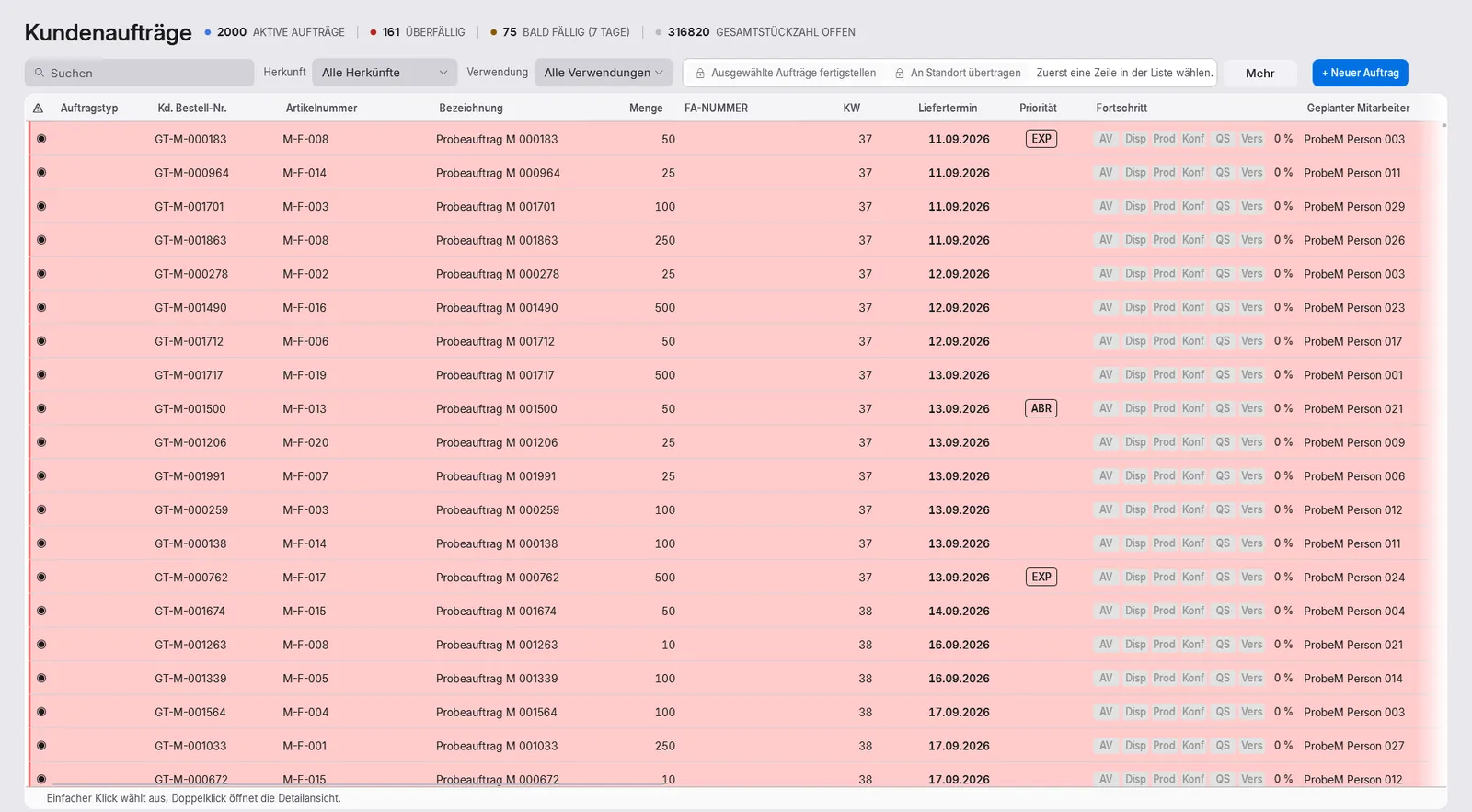
Hand-overs as tasks with owner, deadline and direct link, for example from order confirmation to scheduling or from delivery note to invoicing
Tasks end with a result: done, acknowledged, deliberately deviated with a reason, or postponed with a date
Chain of responsibility and automatic deputies: team, deputies in up to three ranks, a simulation before switching on, every activation logged
Sales from quotation to credit note with product configurator and price maintenance, purchasing with order proposals and invoice matching, basic warehouse and stocktaking. From December 2026 an order received by e-mail becomes an order confirmation after checking and approval.
Receives
Sales & CRM Once the quote is accepted, the task “create order confirmation” is created; the owner travels with it
Costing Approved costing as the price source in the quote, prices taken over into price lists
Core Demand from production orders becomes a purchase proposal
Shops & Marketplaces Orders from shops and marketplaces are checked and turned into an order confirmation
Core The inbox recognises an order e-mail and assigns it to customer and quote; after checking and approval it becomes the order confirmation from December 2026
Subcontracting An external operation on the production order becomes an outsourcing order with provided material and return delivery from December 2026
Complaints Replacement delivery and credit note linked to delivery note and invoice
Integration EDI call-offs come in through Integration and are taken over in Warenwirtschaft from December 2026
Passes on
Core The order confirmation creates a production order per line and hands “schedule” to work preparation; purchase dates show the material risk
Costing Landed costs from supplier invoices flow into costing and margin
Shipping The delivery note becomes a shipment: lines, label, tracking, shipping e-mail
Warehouse Logistics The same articles, stock, batches and reservations, no second warehouse system
Quality Goods receipt requiring inspection: blocked stock and the task “inspect”; the release notifies the waiting order
Accounting Invoices and supplier invoices post themselves when finalised; open items and payment runs
Analytics Documents, stock and deliveries
What the module does
Fixed document sequence from quote to credit note, one process number across all documents
The order confirmation checks bill of materials, routing and material date and creates the production orders
Collective invoice from delivery notes; finalised invoices cannot be changed, corrections are made with a counter-document
Down payment, progress and final invoices; pricing with “Why this price?”; blanket orders with call-off schedule
Costing schemes, formulas, cost rates, quantity scales, scenarios and post-calculation, every price with its derivation. Plus the margin per article and customer and the answer to “Why does this article cost so much?”.
Receives
Sales & CRM Request a costing straight from the enquiry, as a task with a deadline
Warenwirtschaft (ERP) Landed costs from supplier invoices flow into costing and margin
Shop Floor Data Actual times for post-calculation, plan versus actual; from five confirmations a target-time proposal
Passes on
Warenwirtschaft (ERP) Approved costing as the price source in the quote, prices taken over into price lists
What the module does
Costing schemes with lines, variables and formulas (surcharge, machine hour rate, contribution margin); factory templates
Every figure with its derivation, “Why this price?” in the sales document
Cost rates for employee, machine and cell
Operations with separate machine and labour times, set-up time spread over the lot size
Built-in financial accounting: chart of accounts, journal, open items, payments, dunning, cash book, closing and DATEV.
Receives
Customs & Foreign Trade Exit confirmation as proof of the tax-exempt export
Complaints Disputed items in accounting
Warenwirtschaft (ERP) Invoices and supplier invoices post themselves when finalised; open items and payment runs
Passes on
Sales & CRM Open items and credit limit in the sales view of the customer
Analytics Open items
What the module does
Double-entry bookkeeping with chart of accounts templates SKR03 and SKR04 plus templates for Austria and Switzerland; postings are only reversed, never changed
Automatic posting when invoices are finalised, with configurable account determination
Open items, cash discount, write-offs with four eyes, balance confirmation; dunning with proposal, approval and e-mail
Bank statement import (camt.052/.053/.054, MT940, CSV), payment proposal, payment run, SEPA direct debit
Plans the machines: machines, tools and gauges with maintenance and calibration history, due dates and locks. From December 2026: machine per operation, workload and weekly plan per machine.
Receives
Shop Floor Data A reported fault becomes a task with the machine history and a lock proposal
Passes on
Core Maintenance and over-allocation as a notice in planning
Quality Only calibrated gauges: an expired gauge is flagged as soon as work starts at the terminal
MES Cable Assembly Machines and their plan come from POM Machines & Maintenance, the MES records execution expected January 2027
What the module does
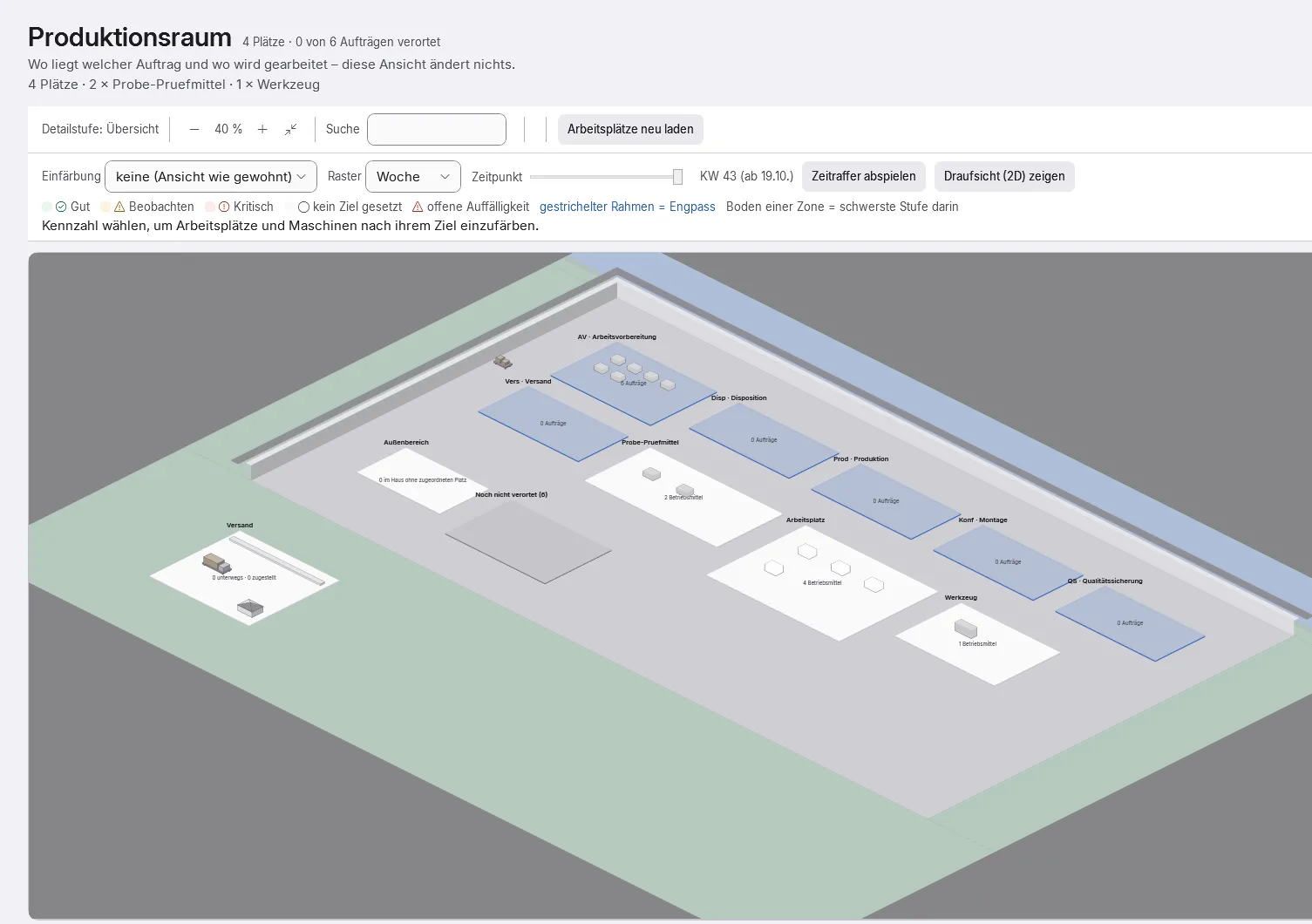
One register for workstations, machines, lines, tools, gauges, fixtures and vehicles
Maintenance and calibration history; the next date is calculated from the history, calibration entries cannot be changed
Calibration requirement per equipment type: notice or refuse the booking
Locks with a reason, release with history; due list with notices in planning, at the terminal and in “Today”
From December 2026: outsource operations to suppliers, external work with provided material, return delivery and incoming inspection.
Receives
No direct connection
Passes on
Warenwirtschaft (ERP) An external operation on the production order becomes an outsourcing order with provided material and return delivery from December 2026
Quality Incoming inspection of the return delivery from December 2026
First module of the MES family: records execution in cable assembly, production plans, control station with set-up optimisation, machine client and OEE. Price per MES user, such as the control station or a machine PC.
Receives
Shop Floor Data MES Cable Assembly builds on shop floor data expected January 2027
Machines & Maintenance Machines and their plan come from POM Machines & Maintenance, the MES records execution expected January 2027
Inspection plans with characteristics and limits, tamper-proof measured values, quality blocks, incoming inspection, gauges and quality key figures. From December 2026 also the scrap log with analysis by reason.
Receives
Machines & Maintenance Only calibrated gauges: an expired gauge is flagged as soon as work starts at the terminal
Shop Floor Data Scrap with its reason from shop floor data goes into the scrap log and is analysed in Quality from December 2026
Subcontracting Incoming inspection of the return delivery from December 2026
Warenwirtschaft (ERP) Goods receipt requiring inspection: blocked stock and the task “inspect”; the release notifies the waiting order
Passes on
Core An open quality block stops the completion
Shipping Blocked goods only leave the building with a special release
Complaints Complaint straight from the inspection record, linked to inspection and block
Analytics Inspections and blocks
What the module does
Inspection plans with versions and characteristics – dimension, attribute, visual, function, document – with limits and sampling instruction
Assignment per article and process step, at goods receipt too
Inspection records cannot be changed; pass or fail is decided by the server, corrections only as a replacement record with a reason
Quality block with reason, quantity and type of release: fixed, special release or scrap
Clock in and out at the terminal, target versus actual, time accounts, corrections, monthly closing, with holiday calendar and leave requests; from December 2026 also leave entitlement calculation.
Receives
Core One employee record: time recording, absence, skills, piecework pay, shop floor data and planning read the same person
Shop Floor Data Contradictions between attendance and shop floor bookings as a list to clear up
Piecework Pay Piecework earnings go into the payroll hand-over at month end
HR Agreed time off in lieu is entered as an absence once the employee agrees from December 2026
Passes on
Core Approved absence immediately affects capacity, planning board and staff suggestions; clocking in and out tells the automatic cover who is present
HR Time accounts and leave account for staff planning and the calculation on leaving from December 2026
Analytics Times, only as group figures, never per person
What the module does
Clocking in and out with a badge (RFID) at the terminal; buffered if the server fails
At the terminal only one’s own data: day, month, account, remaining leave – requests right there
A forgotten clock-out stays open – POM does not invent time
Working time profiles with core time and break rules, shift models, shift plan, supplements
Guided joining and leaving with tasks for everyone involved, application to hiring, contracts and changes and smart staff planning that makes proposals week by week.
Receives
Core The same employee record, HR does not create a second personnel register from December 2026
Time Recording Time accounts and leave account for staff planning and the calculation on leaving from December 2026
Passes on
Core On the effective date POM switches badge, cover and planning; after an approved leaving date nothing is planned beyond the last working day from December 2026
Time Recording Agreed time off in lieu is entered as an absence once the employee agrees from December 2026
Connects external AI programs inside the company network: read, draft and propose only; a person always approves. Off by default, enabled per company, second factor.
Receives
No direct connection
Passes on
Core External AI programs read, draft and propose, never with more rights than the person; a person approves
What the module does
AI interface (MCP): external AI programs inside the company network – read, draft and propose only
A person in the POM workstation always approves
Off by default; enabled per company, approval per program, sign-in with a second factor
Personnel and employee data are blocked for external AI by default
Shown are connections that are built today. Anything that comes later is marked with its status.
All connections as a list (55)
Passes on
Receives
Sales & CRM
Costing
Request a costing straight from the enquiry, as a task with a deadline
Sales & CRM
Warenwirtschaft (ERP)
Once the quote is accepted, the task “create order confirmation” is created; the owner travels with it
Costing
Warenwirtschaft (ERP)
Approved costing as the price source in the quote, prices taken over into price lists
Warenwirtschaft (ERP)
Core
The order confirmation creates a production order per line and hands “schedule” to work preparation; purchase dates show the material risk
Core
Warenwirtschaft (ERP)
Demand from production orders becomes a purchase proposal
Warenwirtschaft (ERP)
Costing
Landed costs from supplier invoices flow into costing and margin
Shops & Marketplaces
Warenwirtschaft (ERP)
Orders from shops and marketplaces are checked and turned into an order confirmation
Core
Warenwirtschaft (ERP)
The inbox recognises an order e-mail and assigns it to customer and quote; after checking and approval it becomes the order confirmationfrom December 2026
Core
Shop Floor Data
Production orders to log on and off at the terminal, “next orders” for the operator
Shop Floor Data
Core
Times and good quantities move the order’s progress on; completion books the receipt
Shop Floor Data
Costing
Actual times for post-calculation, plan versus actual; from five confirmations a target-time proposal
Shop Floor Data
Machines & Maintenance
A reported fault becomes a task with the machine history and a lock proposal
Machines & Maintenance
Core
Maintenance and over-allocation as a notice in planning
Machines & Maintenance
Quality
Only calibrated gauges: an expired gauge is flagged as soon as work starts at the terminal
Shop Floor Data
MES Cable Assembly
MES Cable Assembly builds on shop floor dataexpected January 2027
Machines & Maintenance
MES Cable Assembly
Machines and their plan come from POM Machines & Maintenance, the MES records executionexpected January 2027
Shop Floor Data
Quality
Scrap with its reason from shop floor data goes into the scrap log and is analysed in Qualityfrom December 2026
Subcontracting
Warenwirtschaft (ERP)
An external operation on the production order becomes an outsourcing order with provided material and return deliveryfrom December 2026
Subcontracting
Quality
Incoming inspection of the return deliveryfrom December 2026
Warenwirtschaft (ERP)
Shipping
The delivery note becomes a shipment: lines, label, tracking, shipping e-mail
Warenwirtschaft (ERP)
Warehouse Logistics
The same articles, stock, batches and reservations, no second warehouse system
Warehouse Logistics
Core
Staging for production per shift from the same stock ledger
Shipping
Customs & Foreign Trade
Export process and documents, Customs builds on Shipping
Customs & Foreign Trade
Accounting
Exit confirmation as proof of the tax-exempt export
Warenwirtschaft (ERP)
Quality
Goods receipt requiring inspection: blocked stock and the task “inspect”; the release notifies the waiting order
Quality
Core
An open quality block stops the completion
Quality
Shipping
Blocked goods only leave the building with a special release
Traceability
Shipping
A blocked batch stops shipping automatically
Quality
Complaints
Complaint straight from the inspection record, linked to inspection and block
Complaints
Traceability
Determine what is affected from a batch or a single piece
Complaints
Warenwirtschaft (ERP)
Replacement delivery and credit note linked to delivery note and invoice
Complaints
Accounting
Disputed items in accounting
Warenwirtschaft (ERP)
Accounting
Invoices and supplier invoices post themselves when finalised; open items and payment runs
Accounting
Sales & CRM
Open items and credit limit in the sales view of the customer
Core
Time Recording
One employee record: time recording, absence, skills, piecework pay, shop floor data and planning read the same person
Time Recording
Core
Approved absence immediately affects capacity, planning board and staff suggestions; clocking in and out tells the automatic cover who is present
Shop Floor Data
Time Recording
Contradictions between attendance and shop floor bookings as a list to clear up
Piecework Pay
Time Recording
Piecework earnings go into the payroll hand-over at month end
Core
Piecework Pay
The same employee record, no second staff list for piecework
Core
HR
The same employee record, HR does not create a second personnel registerfrom December 2026
HR
Core
On the effective date POM switches badge, cover and planning; after an approved leaving date nothing is planned beyond the last working dayfrom December 2026
Time Recording
HR
Time accounts and leave account for staff planning and the calculation on leavingfrom December 2026
HR
Time Recording
Agreed time off in lieu is entered as an absence once the employee agreesfrom December 2026
Core
Analytics
Orders, dates and lead times
Warenwirtschaft (ERP)
Analytics
Documents, stock and deliveries
Shop Floor Data
Analytics
Feedback from production
Accounting
Analytics
Open items
Quality
Analytics
Inspections and blocks
Complaints
Analytics
Complaints
Time Recording
Analytics
Times, only as group figures, never per person
Integration
Warenwirtschaft (ERP)
EDI call-offs come in through Integration and are taken over in Warenwirtschaftfrom December 2026
Integration
Core
Writes orders, customers, articles and employees from other systems; feedback goes back
AI Interface (MCP)
Core
External AI programs read, draft and propose, never with more rights than the person; a person approves
Multi-Site
Core
Stock and ledgers per site; one order can run across two plants
Multi-Company
Analytics
Consolidated reporting across several companies
Process chain
One process. One number. All the way to payment.
Quotation, order confirmation, delivery note and invoice share one process number. At every step POM shows what is done, what comes next and who has the process.
01Enquiry
The enquiry arrives.
The sales mailbox assigns the e-mail and the enquiry goes to the owner automatically, as an inbound task with a deadline. You request the costing straight from the enquiry.
with Sales & CRM
02Quote
The quotation gets the number.
The approved costing flows into the quotation and pricing follows a fixed, visible order, with “Why this price?”. From here on every document carries the same process number.
03Order
The order confirmation checks first.
It checks the bill of materials, routing and material date and creates a production order for each production line item. Scheduling becomes a task for work preparation.
04Prod.
The production order runs.
If material is missing, the order is blocked, once it arrives, the block lifts. Completion checks mandatory steps, quality hold and quantity tolerance and books the stock.
05Delivery
The delivery note books out.
The delivery note books the stock out. Invoicing is created as a task for accounting, with a prefilled form. If the follow-up document already exists, the action reads “open”, so nothing is created twice.
06Invoice
The invoice is finalised.
POM proposes the invoice from the delivery notes; anything already invoiced is not charged twice. Once finalised it cannot be changed. The XRechnung is written, read back and checked, a file with errors does not leave the building.
07Payment
Only payment closes it.
A process is only closed once every mandatory station up to payment is done. Accounting adds open items and bank statement import.
open items with Accounting
Process
26-0412
NordlichtCable set K-90 · 150 pcs
EnquiryQuoteOrderProd.DeliveryInvoicePayment
Status
Enquiry · assigned
Next step
Create quotation
Then with
SSales
Status
Quotation · sent
Next step
Create order confirmation
Then with
SSales
Status
Order confirmation · checked
Next step
Schedule production order
Then with
WWork preparation
Status
Production order · completed
Next step
Create delivery note
Then with
DDispatch
Status
Delivery note · booked
Next step
Create invoice
Then with
AAccounting
Status
Invoice · finalised
Next step
Match incoming payment
Then with
AAccounting
Status
Payment · matched
Next step
All mandatory stations done
7 / 7
Sample data
Every role, its own tools
One system. For everyone in the company.
In POM everyone sees what belongs to their job, menu items only appear with a booked module and the matching permission. This is what the day looks like in the main roles.
Management
Sees the situation without asking around.
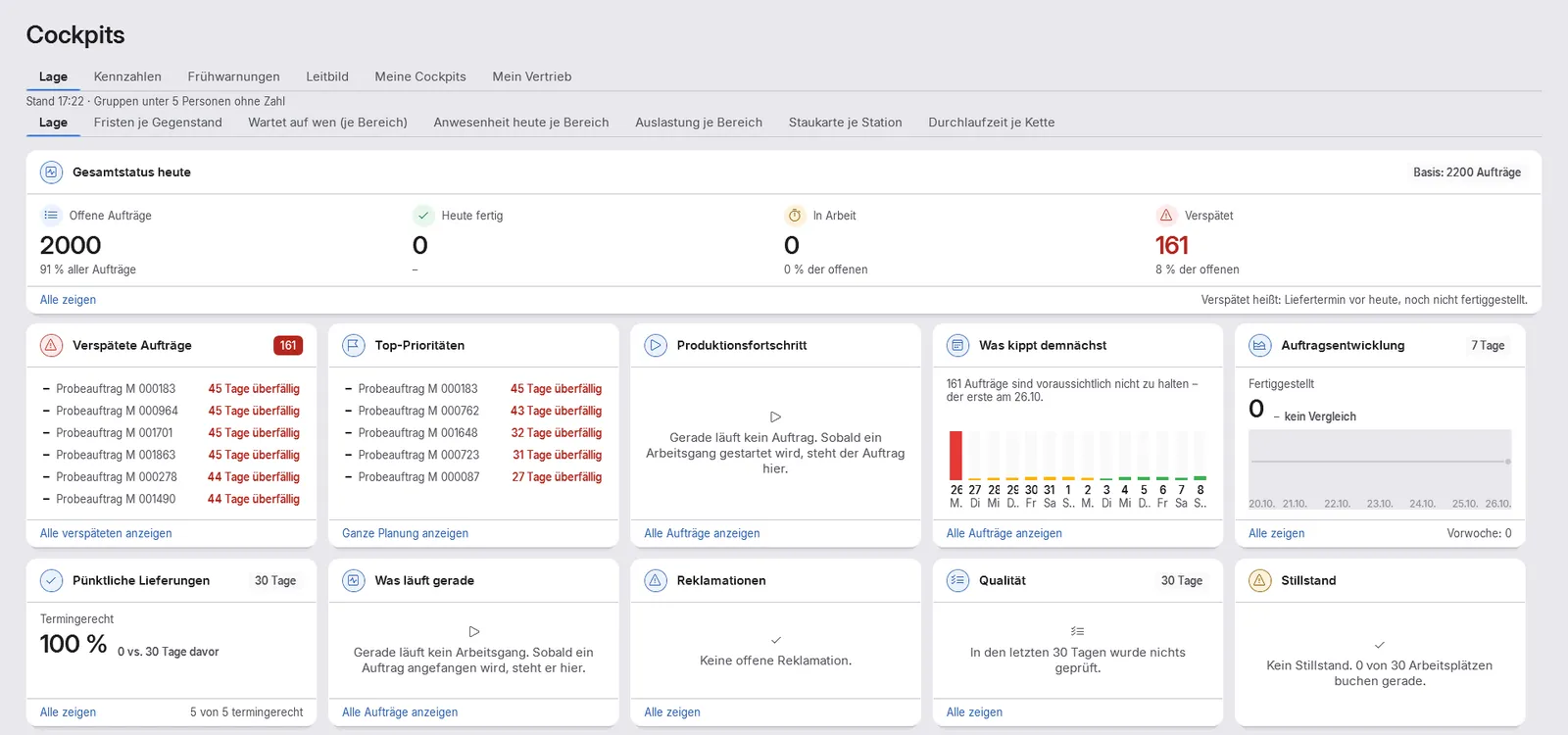
“Situation” cockpit: what is late, what is about to slip, how on-time delivery stands, calculated once on the server
Early warnings with a next action and a “Why?” for every change, without AI, never about individual people
Look into every process from enquiry to payment, with status and owner
As the named head, the last step of every escalation: no process is left without a next step
Big enough for your company. Clear enough for every day.
22
modules, each added to the core on its own
11
languages across interface, help and error messages
around620
operating rules to fit POM to the way you work
Why WEKAS
We build what we need ourselves.
Out of the shop floor
WEKAS is the software brand of Powertune Spezialkabelsysteme GmbH & Co. KG. POM grew there in live operation, because we needed it ourselves.
Your data stays with you
POM runs on your server, not in someone else’s cloud. No dependency on a data centre you have never seen.
We keep developing, with you
You talk directly to the people who write POM. Improvements from your plant are built promptly and at no extra charge when they make POM better. Updates are included in the subscription.
Outlook · not yet available
Next up: the machines.
MES for cable assembly is in development, expected January 2027, with customer pilots from the first quarter of 2027. Today you record times, quantities and faults with shop floor data collection at the terminal.
Which machine can make this part?
Machines with capabilities and limits, the answer comes with its reasoning.
Set-up-optimised sequence
A control station proposes the sequence per machine, with a preview before it is adopted.
Good quantity, scrap, OEE
Feedback per machine, tool passport and material batches.
MES Universal is expected in early 2027, MES for machining later, with no date set. The signal tower is an illustration.
Every licence includes POM Core: orders, master data, planning, Today, tasks and collaboration. On top, you add 22 modules one by one as you need them, from ERP and accounting through shop floor data and quality to multi-company and multi-site. Whatever is entered once, every further module uses too.
POM MES Kabelkonfektionexpected January 2027First module of the MES family: machines with capabilities, production plans, control station with set-up optimisation, machine client and OEE. Customer pilots from Q1 2027.
POM MES Universalexpected early 2027The MES for any production without an industry-specific MES: records what really happens at the machines, states, messages, signals, control station and OEE. Planning stays in POM Machines & Maintenance.
POM Intelligencepilot operationLocal AI assistant: answers from your own data with sources, drafts for approval, no cloud. Marked as such until the legal review is complete.
Not yet available. MES Universal is expected in early 2027, MES for machining later, with no date set.
Your price in 30 seconds.
Choose modules, set the users per module, the price calculator shows the amount monthly and annually.
For the core and for each module you book as many concurrently signed-in users as you need. Each shop floor terminal counts as one user (core and BDE); workers book there with their badge and need no licence of their own. User accounts are unlimited. All prices net, plus statutory VAT. Every module in detail
Industries
Built for companies that manufacture to a deadline.
Wherever an order passes through several operations, quantities matter and the delivery date is not negotiable, POM helps. The industry is secondary, what counts is that you manufacture.
Cable assembly & electrical
Many variants, small batches, every order different. Exactly the environment POM grew up in.
Machining & contract work
Turning, milling, drilling to customer order. Plan orders and operations instead of guessing them.
Sheet metal
Cutting, bending, welding, coating, four operations, four possible bottlenecks.
Plastics
Injection moulding and assembly with tool changes that want planning.
Textiles & sewing
Sewing, cutting, homework. Piece rate accounting is daily business here.
Assembly, packing & dispatch
Kitting, picking, shipping, with the delivery note on the same order.
Products
One platform. Several tools.
WEKAS builds software for companies that manufacture. Each product solves a concrete everyday problem and works together with the others.
After the demo you can test POM in your own plant for 30 days, once per company, via a personal download link. First we show you POM online with a sample company.


 POM One database