

POM Analytics
Key figures & cockpits
One key figure register, calculated on the server: statistics with a time axis, cockpits per person and area, and a path down to the single document.
+29 € / month net with 1 user
Online demo first, then a 30-day trial
- 01
The problem
The numbers exist, but assembling them for management takes a day in spreadsheets – and every spreadsheet calculates a little differently.
- 02
How POM solves it
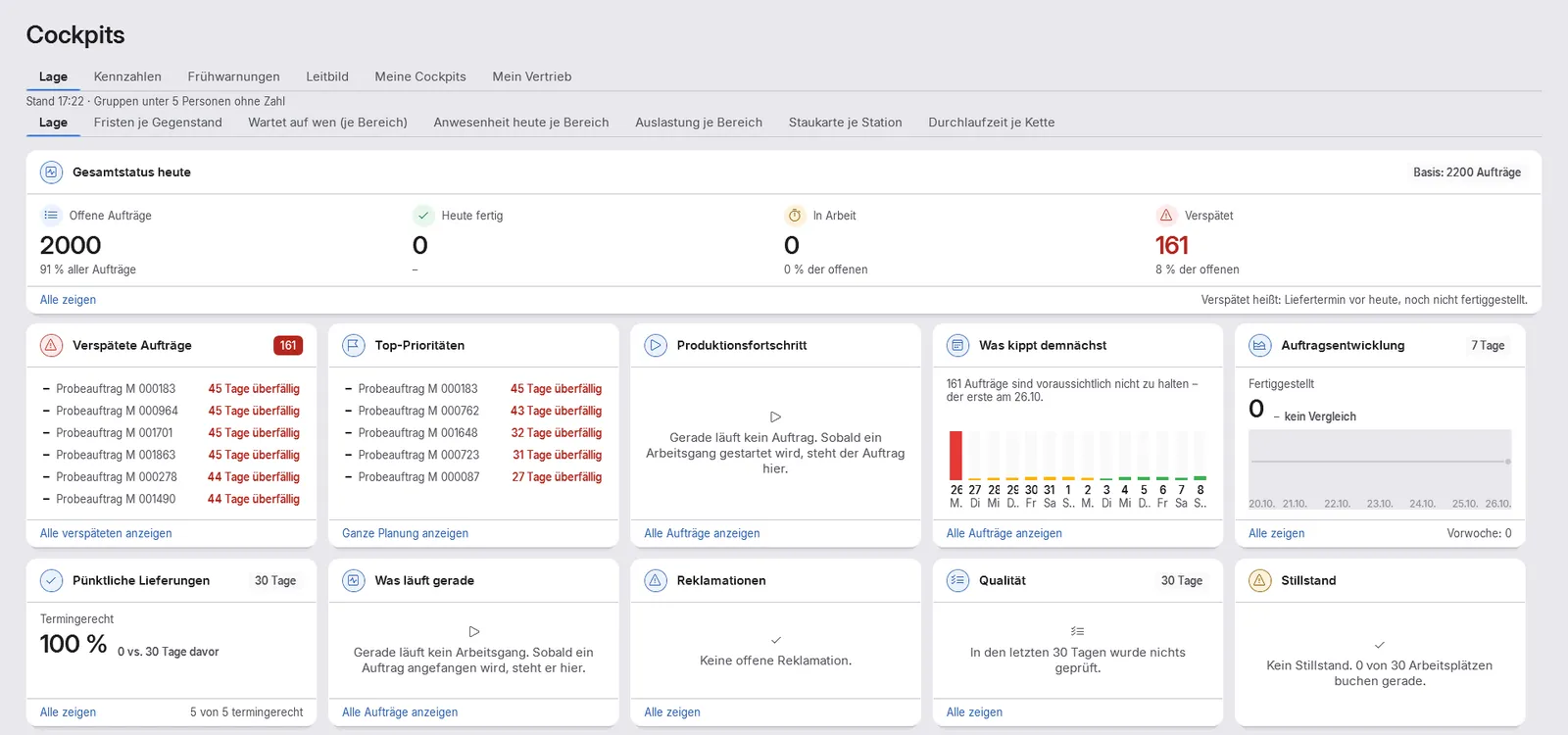
Every key figure is calculated once on the server; screen, cockpit and export show the same number. Statistics compare with the previous year, plan or a rolling twelve months, and every tile can be opened down to the document. The “Situation” cockpit shows deadlines, waiting times, workload and lead time.
- 03
The result
Decisions run on this morning’s data, not last month’s export.
Functions
What is inside.
-
Key figure register on the server: screen, cockpit and export show the same number
-
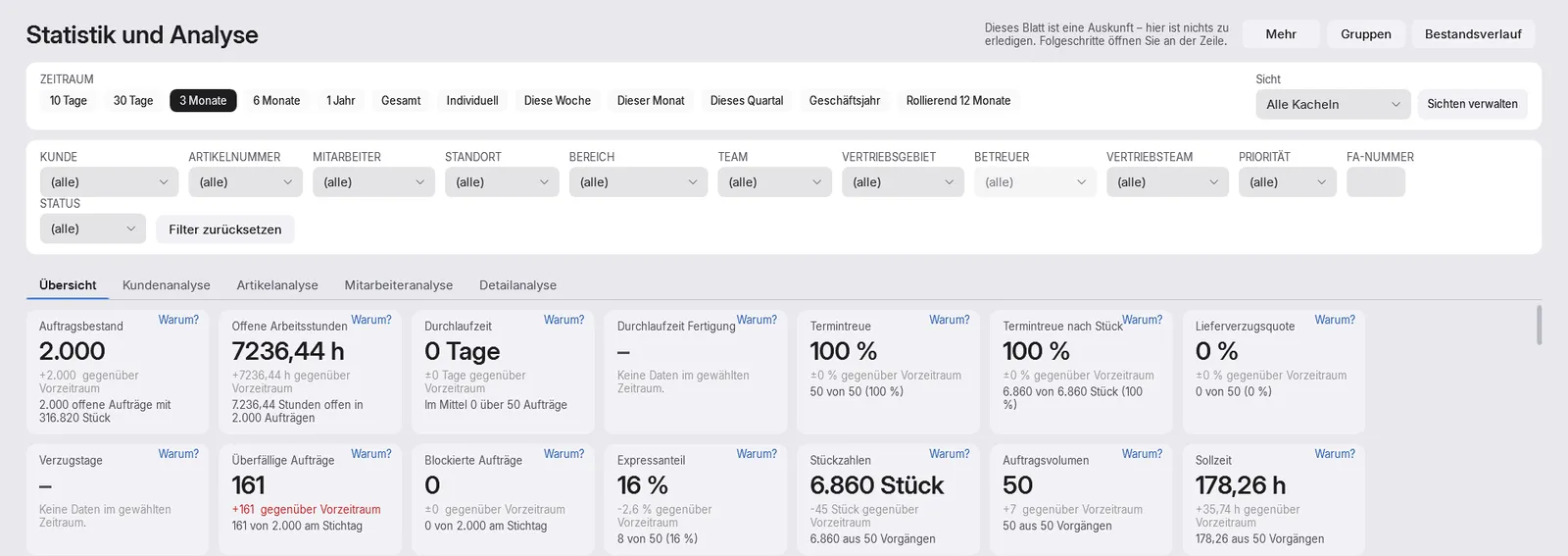
Statistics with a time axis – previous year, plan or target, rolling twelve months – and group analysis
-
Document path: open every tile down to the single document
-
On-time delivery, key figures per area and statistics exports
-
“Situation” cockpit with deadlines, waiting times, workload and lead time; targets, views and cockpits per person and area
-
Nightly check for outliers and trends with “Why?” against the previous period or year – statistical, not AI, never about individuals; partly built
-
Consolidation across companies, together with POM Multi-Company
-
Area key figures, ABC/XYZ and lead times are available in the core even without this module
- Roadmap
No date yet: what-if as well as Excel and print output on every table
How it fits together
Every module feeds the next.
Receives
- POM Core Orders, dates and lead times
- POM Warenwirtschaft (ERP) Documents, stock and deliveries
- POM Shop Floor Data Feedback from production
- POM Accounting Open items
- POM Quality Inspections and blocks
- POM Complaints Complaints
- POM Time Recording Times, only as group figures, never per person
- POM Multi-Company Consolidated reporting across several companies
Price
Concurrent users count, not accounts.
Module, booked individually 10 % saving with annual billing
| POM Analytics | with 1user | with 5users | with 10users | with 20users | with 50users | more than 100users |
|---|---|---|---|---|---|---|
| net / month | +29 € | +133.40 € | +249.40 € | +452.40 € | +974.40 € | On request |
| net / month, annual billing | +26.10 € | +120.06 € | +224.46 € | +407.16 € | +876.96 € |
Example amounts with the same number of users, net plus statutory VAT. Per module you book as many concurrent users as you need, at most as many as in the core. User accounts are unlimited.
More than 100 concurrent users: individual quotation, price on request. Request a quote
Quick answers
Questions about POM Analytics
Why do all evaluations show the same number?
Because POM Analytics calculates every key figure once on the server. Screen, cockpit and export read from the same key figure register. Every tile can be opened down to the single document.
What does “Why?” on a key figure mean?
A nightly check looks for outliers and trends and explains them against the previous period or year. This is statistics, not AI, and never about individuals; for groups under five people POM shows no person-level figures. This part is only partly built so far.
What is available without this module?
Area key figures, ABC/XYZ analysis and lead times are part of the core. POM Analytics adds statistics with a time axis, cockpits per person and area, targets, exports and, with POM Multi-Company, consolidation across companies.
POM in your industry
Where POM Analytics matters most.
-
Automotive suppliers
Delivery performance, call-offs and evidence – for customers who audit their suppliers.
Learn more -
Aerospace-adjacent manufacturing
Evidence duties, qualifications and traceability expectations of demanding customers.
Learn more -
Contract manufacturing
Changing customers, changing parts – margins decided in the quote and defended on the floor.
Learn more
See POM for your business.
First we show you POM in an online demo with a sample company. After that you can test it for 30 days with a trial licence of your own.