

Guided experience
POM guides you through the day.
Everyone sees what is due. Every hand-over becomes a task with a deadline. POM says what is missing before it hurts. Your company sets the rules, POM guides within them, your people decide.
The guiding idea
Set freely. Guide strictly.
The more strictly a system guides, the more rigid it usually feels. POM therefore separates two levels: your company sets the rules, POM guides consistently within them.
You set
- which steps exist and which are mandatory
- who is responsible and which deadline applies
- how strict a check is: off, warn or block
- which modules are booked
POM guides
- what needs doing next
- who has to do it and by when
- why something is not possible yet
- and reports what is being left lying
Never silent
Every exception is possible but only with a reason, a log entry and a visible notice.
No AI, no internet
POM’s guidance calculates with your rules and data. An AI assistant can add to it but is never required.
Roles are free
No process depends on a fixed role name. Recipients come from the function your company has staffed.
01 Today
Every day starts with what is due.
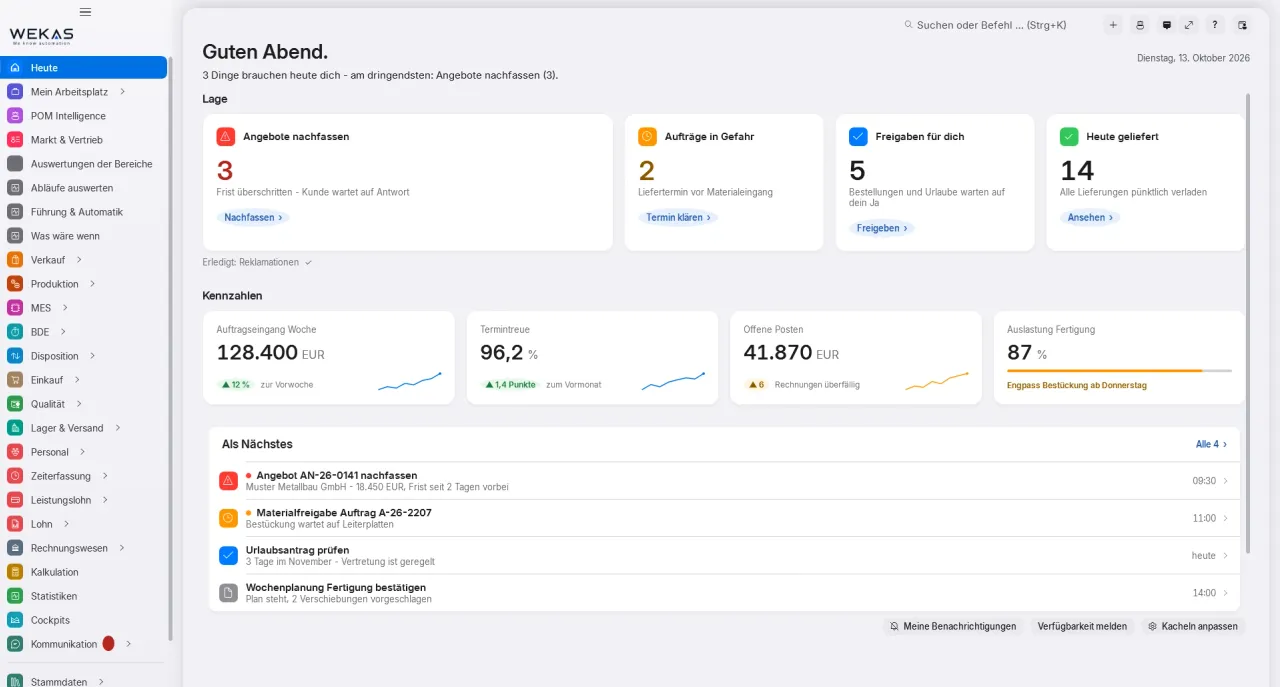
The “Today” start page is the personal work list and the inbox for hand-overs. It answers three questions: What is waiting for me? What am I waiting for? Who is waiting for me?
Sorted by urgency
Critical, action needed, information. Every line names the action, the owner, the deadline and what it is waiting for and jumps straight into the record.
Only what concerns you
A notice only appears if the module is booked, you are among the recipients and you have the permission. Thresholds and recipient groups are set by your company.
“Ready for you”
If you can carry out the next step yourself, you do not get a task for yourself, POM offers you the step directly. Once something you were waiting for is fulfilled, POM tells you exactly once.
Me or team
Switch between your own list and the team’s work pool. Tasks for an area are taken over by whoever has time.
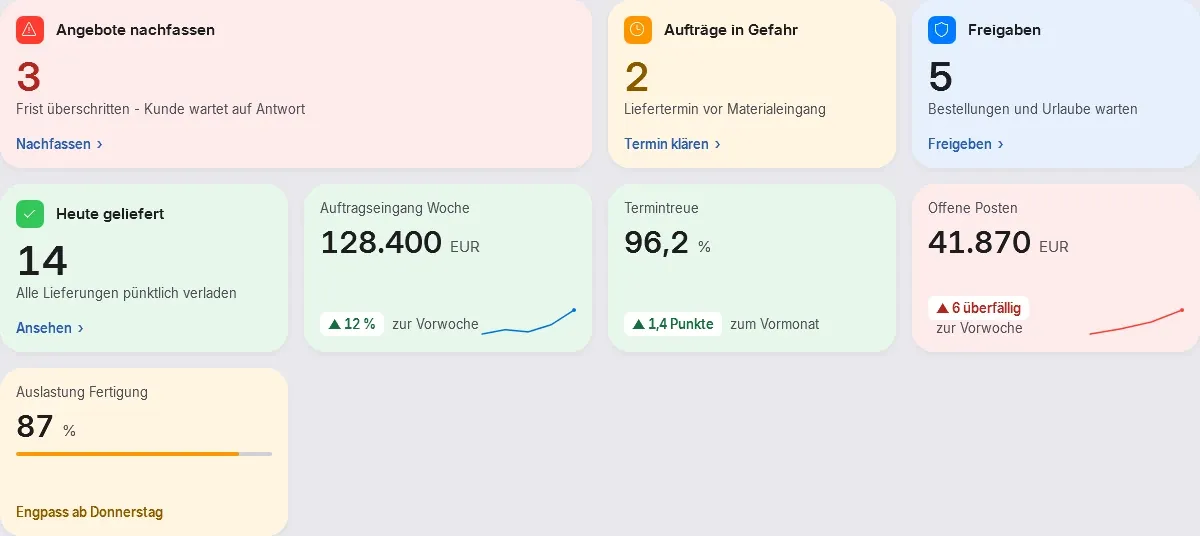
- 1What is waiting for me?
- 2What am I waiting for?
- 3Who is waiting for me?
02 Hand-overs
POM tells the next person.
When a process moves to another department, a stored task is created for the person responsible, with an owner, a deadline and a direct link. No note, no phone call, no e-mail that gets lost.
Deadline in working days
Calculated on the recipient’s calendar, public holidays per person, site and company.
“With … since …”
The sender sees who has the process, since when and until when, even without read access to the follow-up document.
You choose the channel
Inside POM via Today, the bell with a counter and messages, plus a summary e-mail of open tasks. Per notice type: immediately, bundled or only in the summary, critical items always arrive immediately.
Nothing is created twice
POM never creates follow-up documents itself but as a prefilled task. If the document already exists, the action reads “open”. If two people press “create invoice” at the same time, one invoice is created.
Factory hand-overs, each one can be switched off
- Order confirmation confirmed ScheduleWork preparation
- Goods receipt to inspect InspectQuality
- Completion Create delivery noteDispatch
- Delivery note InvoiceAccounting
- Internal order Release stock orderPlanning
- New hire Prepare user accountAdministration
“Create delivery note” and “invoice” are off by default, your company switches them on if it works that way.
03 Deadlines and escalation
Whatever is left lying gets noticed.
Every task has an owner and a deadline. When the deadline passes, the task moves up one level, up to the head your company names during set-up.
Remind, then escalate
Deadline and date watches report exactly once per deadline. After expiry the task goes to the superior, finally to the named head; after how many days is up to you.
Staged instead of alarm
For schedule risk: a used-up buffer is a notice, a missed start a check task, a missed customer date high priority, with information to sales and the task “inform the customer”.
At suppliers too
If the supplier’s order confirmation is missing: first a notice, then a reminder with a draft e-mail, then escalation.
No dead ends
Every open process needs a next step or a waiting state with a deadline. If both are missing, a clarification goes to the person responsible, shown as critical in Today.
The chain of responsibility
- 1Owner
- 2Team
- 3Cover, ranks 1–3
- 4Lead owner
- 5Named head
04 Guided entry
POM says what is missing and where.
If an action is not possible yet, it does not simply stay grey. POM names the reason and takes you straight to the missing field with “add now”. Screen and server give the same reason.
Mandatory, three settings
Every requirement is set to off, warn or block. If a mandatory value is missing, POM does not quietly guess but turns it into a task.
Done means done
A step only counts as done with a stored result, an approval, a posting or proof of shipment. Opening or ticking is never enough, on any path: screen, import, interface or AI.
Four ways to close a task
Done with a result, acknowledged, deliberately deviated with a reason, or postponed to a date, then it is back in Today, deadline and escalation keep running.
Exceptions with a name
Shipping blocked goods or skipping a check is only possible with a dedicated permission, a mandatory reason and a log entry.
05 Responsibility and cover
If someone is away, the company keeps running.
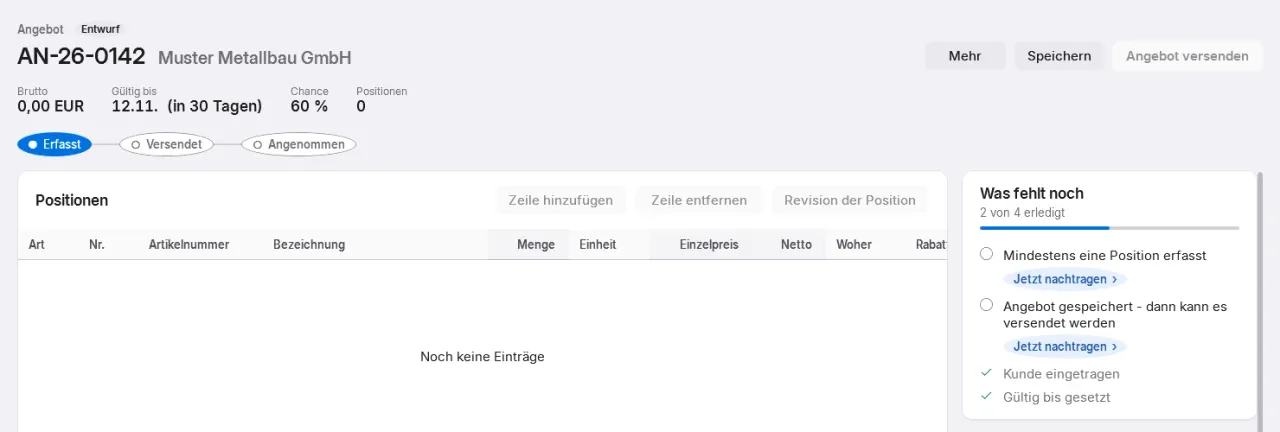
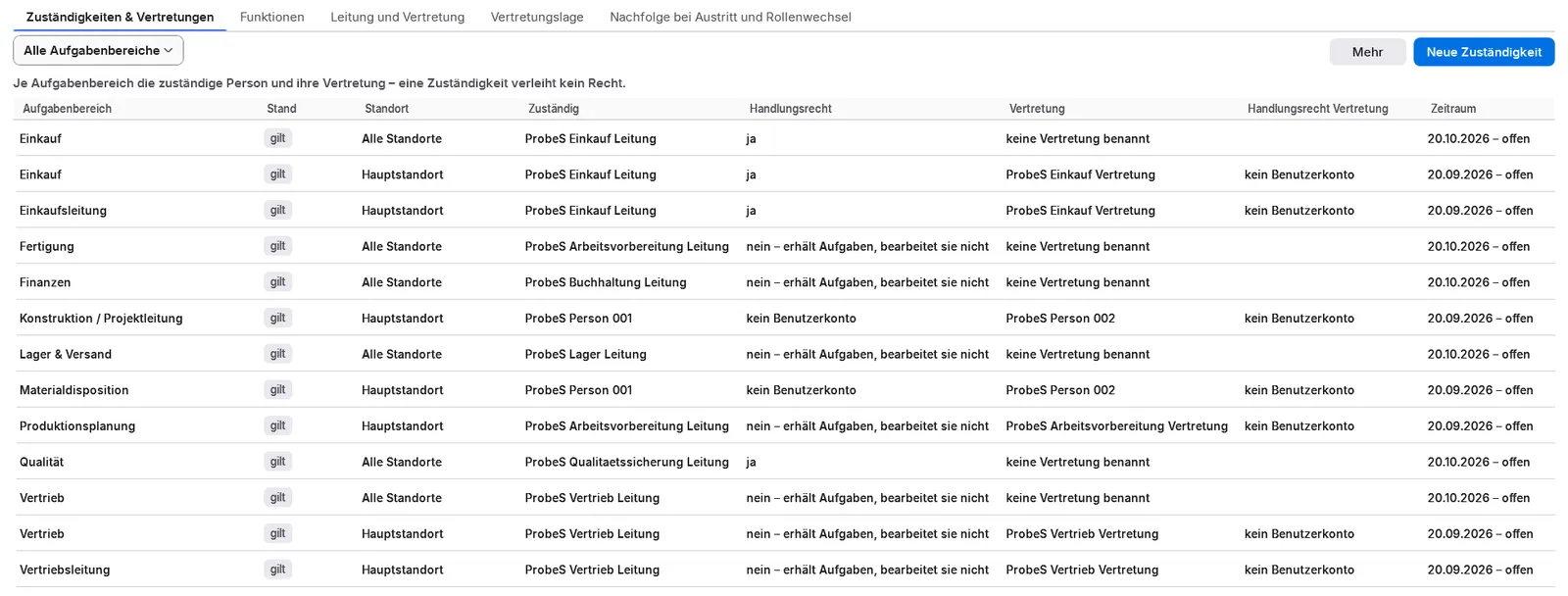
Tasks go to one person, not to “everyone with access”. Responsibilities belong to functions such as purchasing or planning, per task area and site. If someone is away, cover steps in.
POM knows who is in
From working time and shifts, approved absence, sick notes, clocking in and out and self-reporting. A missing clock-in first counts as unclear, cover only starts after a grace period.
Team first, then the chain
Owner, team, cover in up to three ranks, lead owner, named head. How independently POM covers is up to you: off, inform only, within the team, as a proposal or by itself.
Simulate first
Before switching on, a simulation shows: “If A and B are away, C takes over.” Every activation is logged.
Permissions stay permissions
Cover never transfers permissions by itself, only via a pre-approved cover package. If someone leaves, POM moves all responsibilities to the successor with a preview.
06 Every role, its own tools
Everyone sees what they need. No more.
POM separates four things that are often mixed up: licence (which functions does the company have?), permission (what may a person do?), responsibility (who gets tasks?) and display (what does the person see?).
Only one’s own tools
A menu item only appears with a booked module and the matching permission, in search too. The server checks the same on every access.
Navigation by work area
Switchable per person: navigation by work area, sell, procure, produce, people, finance. It follows the person to every computer. At the shop floor terminal, hall monitor and time clock POM runs in the matching device mode.
“With …” instead of a grey button
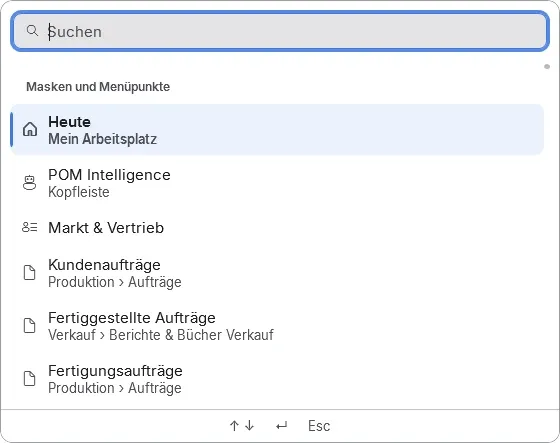
If you lack the permission and someone else is responsible, POM shows who has it. Ctrl+K finds screens, settings and records, without permission it says who is responsible.
Traceable permissions
Role templates, freely editable. One level switch per area: no access, view, edit, full. The permission simulation shows what POM looks like for a person.
Every role, its own tools
One system. For everyone in the company.
In POM everyone sees what belongs to their job, menu items only appear with a booked module and the matching permission. This is what the day looks like in the main roles.
Management
Sees the situation without asking around.
- “Situation” cockpit: what is late, what is about to slip, how on-time delivery stands, calculated once on the server
- Early warnings with a next action and a “Why?” for every change, without AI, never about individual people
- Look into every process from enquiry to payment, with status and owner
- As the named head, the last step of every escalation: no process is left without a next step
Modules POM AnalyticsPOM Core
POM assigns, for example
- Clarification: process without a next step
- Escalation: deadline passed
Sales
Works with the same data as production and purchasing.
- Enquiries, opportunities and pipeline; Customer 360 shows everything POM knows about a customer
- Request a costing straight from the enquiry, POM says which detail is still missing
- See credit limit, dunning level and availability already in the quote
- If a customer date slips, the task “inform the customer” arrives
POM assigns, for example
- Follow up quote
- Create order confirmation
- Inform the customer
Purchasing
Orders what production really needs.
- Purchasing control centre with a prioritised work list; the order proposal arrives as a batch to decide on
- Request for quotation with price comparison, supplier comparison with the real unit price
- If the supplier’s confirmation is missing, POM reminds with a draft e-mail, then the task escalates
- Goods receipt with purchase-order reference, supplier invoice with 2-way/3-way matching and approval
Modules POM Warenwirtschaft (ERP)
POM assigns, for example
- Adjust lead time?
- Supplier confirmation missing
- Approve supplier invoice
Work preparation & planning
Plans with the real state, not yesterday’s.
- Once the order confirmation is confirmed, the task “schedule” arrives with a deadline
- Planning board: drag the bar, the server calculates the end and the following operations; conflicts appear as notices
- Schedule risk with traffic lights, staff suggestions and a skills check when scheduling
- Approved absences immediately affect capacity
- From December 2026 and POM HR: staff planning proposals, such as reducing overtime when there is little to do
POM assigns, for example
- Schedule
- Check schedule risk
- Release stock order
Operator at the terminal
Scans, starts, reports, without a licence of their own.
- Scan production order and personnel number, start and stop; the badge is enough
- Scrap and rework with a reason; if something is missing before the start, the terminal says what
- “Next orders” instead of the planning board, just what comes next
- At the time clock: clocking in and out, time account, remaining leave and requests, only one’s own data
POM assigns, for example
- Next order
- Report missing material
- Request leave
Quality
Knows what has been inspected and what does not leave the building.
- Inspection with records, blocks and inspection plans in one screen
- “Goods receipt awaiting inspection” with a deadline in Today, whoever recorded it may never release it
- Complaints with 8D report, root cause analysis and actions, distributed to the responsible areas
- Traceability forwards and backwards, recall and gap report before the audit
Modules POM QualityPOM ComplaintsPOM TraceabilityPOM Machines & Maintenance
POM assigns, for example
- Inspect
- Action from 8D
- Calibration due
Accounting
Does not re-type, checks and approves.
- Invoices and supplier invoices post themselves when finalised
- Open items, bank statement import and a note on how far statements are complete
- Dunning drafts as a batch task; write-offs above the limit go to a second person
- DATEV to the tax adviser and back; the firm can get a role that only views and exports
POM assigns, for example
- Invoice
- Import bank statement
- Monthly package to the tax adviser
HR & payroll office
Closes the month instead of collecting lists.
- Month end: “incomplete” list, close the month, hand-over to payroll with target, balance and piecework
- A forgotten clock-out stays open as an inconsistent booking, POM does not guess
- Leave requests arrive as an “approve” task
- Piecework and homework with a monthly list per employee; POM does not run payroll itself
- From December 2026 and POM HR: joining and leaving as a process with tasks for IT, supervisors and payroll
POM assigns, for example
- Approve
- Clear inconsistent booking
- Close the month
Roles in POM can be named and combined freely; the supplied roles are templates. Task names are examples from POM.
07 Suggestions
POM learns from your data. You decide.
With every finished job the targets get better: POM compares plan and actual, detects deviations and proposes. Nothing is adopted until a person confirms it.
Target times from production
Post-calculation compares plan and actual and proposes a new target time from five confirmations. Too few cases? Then POM says so instead of guessing.
Learning lead times
If a supplier’s lead time deviates consistently, the task “adjust lead time?” arrives, adopt it or deliberately keep the old one with a reason.
Ordering and producing
Purchase and production proposals rounded to minimum quantity and price breaks; a reorder point you maintain by hand is never overwritten.
Overnight anomalies
Overnight POM checks targets, outliers and trends and turns them into tasks for the responsible function, never about individual people.
No AI · no internet
Recreated view, sample data
08 A start without empty screens
POM never arrives empty.
POM ships with templates you can change or delete: catalogues, forms, print templates, roles and workflows. You bring in your data with an import that shows beforehand what will happen.
Factory templates
One button creates what is missing, never overwriting. Plus workflow templates for sales, purchasing and production orders, order types and charts of accounts.
A trial run first
Map columns with a suggestion, then a trial run that writes nothing. Empty columns overwrite nothing.
A report per record
New, changed with fields, unchanged or rejected with a reason. Anything incomplete is not guessed but reported as a task, it closes itself once everything is filled in.
Open orders at a cut-off date
Take over open order lines and quotes from your previous system, with preview, report and undo.
Import trial run
Articles.csv · nothing written
- 231new
- 9changed, with fields
- 2unchanged
- 6incomplete, becomes a task
- 2rejected, with a reason
Recreated view, sample data
Fits your size
On your own, in a small team or with departments.
During set-up your company chooses its operating mode; role defaults and four-eyes approvals follow from it. The process stays the same, whoever has the permission and responsibility carries straight on. The four-eyes check can only be switched off in a one-person company, with a reason and a log entry.
On my ownSmall teamDepartments
See POM guide.
In the online demo we use a sample company to show you how an order is guided from enquiry to payment, with the roles that exist in your company.