DE EN
Request a demo

Function overview

Everything POM does.

199 available functions in 25 areas and modules, all on one database. Filter by area or search for a keyword. Anything that only comes later is marked as such.

Core

POM Core

Orders and production orders, master data, Today, tasks, messages, calendar, forms, workflows, hazardous substances register and administration. With planning: planning board, capacity and staff suggestions. From December 2026 with an inbox that recognises e-mails and assigns them to the right case.
Core
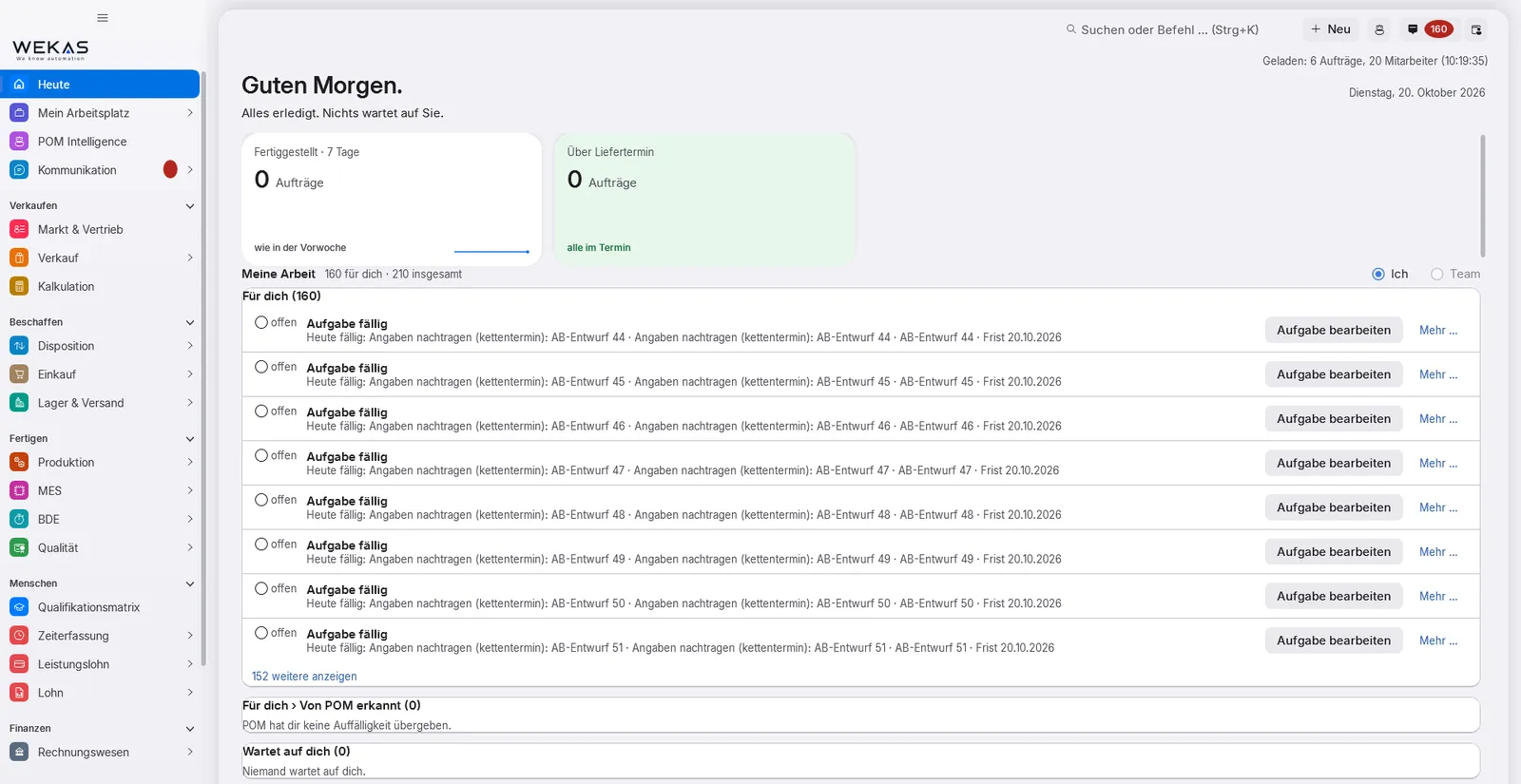
POM start page “Today” with the work list of the signed-in person
  • “Today”: what is due for me? What am I waiting for? Who is waiting for me? – with notices by urgency
  • Hand-overs as tasks with owner, deadline and direct link, for example from order confirmation to scheduling or from delivery note to invoicing
  • Tasks end with a result: done, acknowledged, deliberately deviated with a reason, or postponed with a date
  • Chain of responsibility and automatic deputies: team, deputies in up to three ranks, a simulation before switching on, every activation logged
  • Suggestions from your own data, without AI and without internet – such as staff suggestions, production proposals and reorder points
  • Orders: order overview with colour logic, saved views and Excel output; freely definable order types with their own workflow
  • Master data: articles, bills of materials with unchangeable revisions, customers, suppliers, employees with a skills matrix
  • Planning: planning board per employee, capacity from working time, absence and public holidays – see POM Planning
  • Tasks, messages on the record, calendar, forms and versioned workflows
  • Layout designer for business documents and labels: templates, versions, letterhead, ZPL for label printers, barcodes up to GS1
  • Incoming e-invoices: XRechnung import for supplier invoices – even without Warenwirtschaft
  • Hazardous substances register with safety data sheet and details on the article, even without Warenwirtschaft
  • Planned From December 2026: inbox: fetch the mailbox, recognise e-mails and assign them to the right case; with POM Warenwirtschaft an order e-mail becomes an order confirmation
  • Roles and permissions: role templates, one level switch per area, permission simulation, second factor – enforced on the server
  • Eleven languages, light and dark display, search with Ctrl+K
  • Planned From December 2026: F1 help for every screen, in eleven languages
  • Deadlines and escalation: when a deadline passes, the task goes to the superior and finally to the named head; no open process is left without a next step
  • Factory templates: one button creates catalogues, forms, print templates, roles and workflows – only what is missing, never overwriting
  • Master data import for customers, suppliers and articles with column suggestions, a trial run and a report per record; open orders and quotes taken over at a cut-off date, with undo
  • Data protection built in: information requests as a list or PDF, anonymising instead of deleting, reports only as group figures
  • Planned From December 2026: machine and order planning per operation, backward scheduling from the delivery date, a feasible delivery date already in the quote
Module page

POM Planning

Planning in the core: assign orders and operations to employees on the planning board – with capacity, schedule risk and staff suggestions.

In the core
  • Planning board with order, employee and equipment views
  • Capacity and workload per week – from working time, shift plan, absence and public holidays
  • Schedule risk with traffic lights and staged check tasks; warning “end after delivery date”, the schedule watch reports delays
  • Staff suggestions with five switches; qualification check when scheduling as off, notice or block
  • “Next orders” for the operator, without a Gantt chart
  • Print the order overview and export it to Excel
  • Part of POM Core – included in every licence
  • Planned From December 2026: machine per operation with set-up as a block of its own, backward scheduling from the delivery date with proposal and confirmation, a feasible delivery date already in the quote
  • Planned From December 2026: planning board by machine and a weekly plan per machine to print and post – today you assign the machine to the whole order
  • Planned No date yet: plan-versus-actual Gantt, bottleneck analysis and scenarios in planning
Module page

Business

POM Warenwirtschaft (ERP)

Sales from quotation to credit note with product configurator and price maintenance, purchasing with order proposals and invoice matching, basic warehouse and stocktaking. From December 2026 an order received by e-mail becomes an order confirmation after checking and approval.

Module
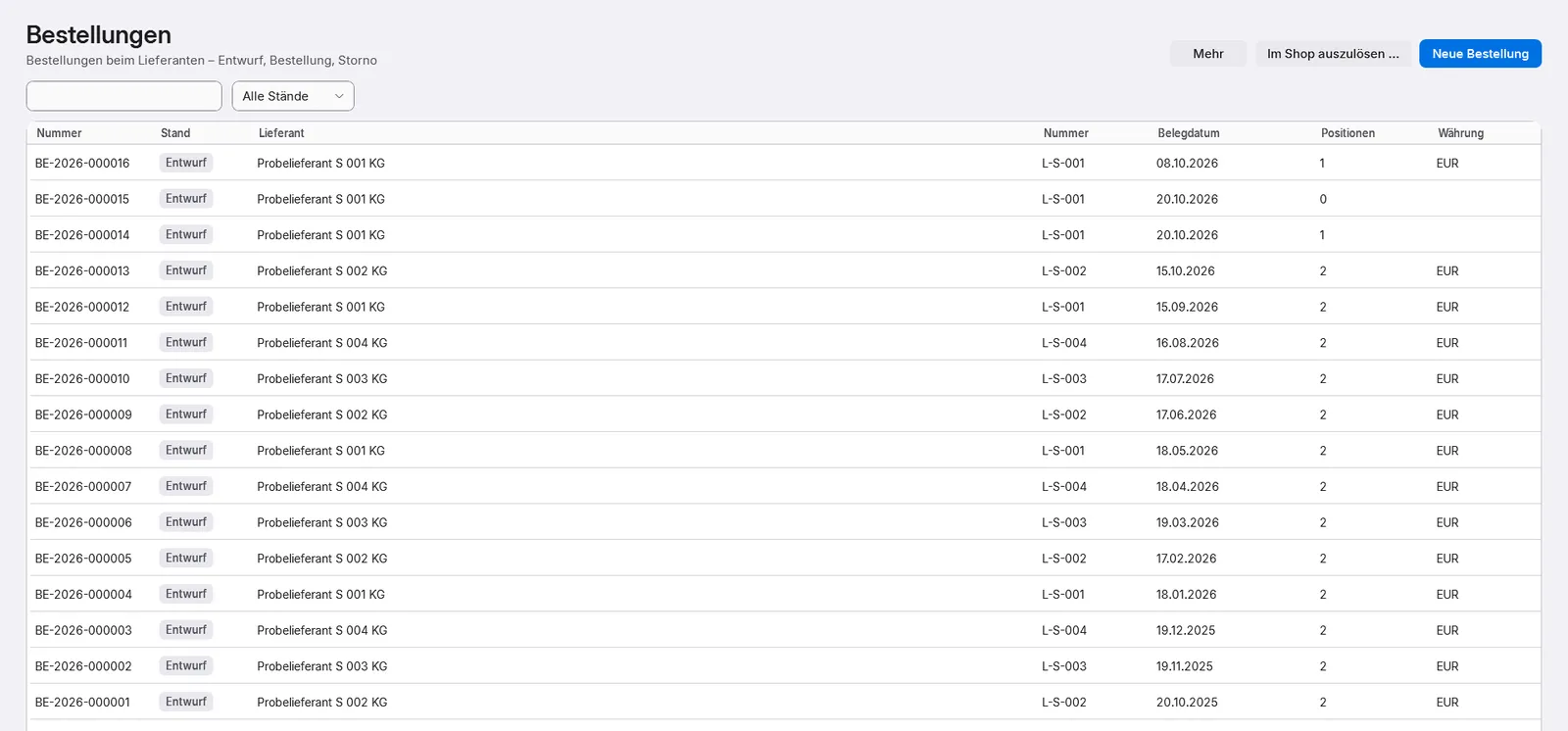
POM purchasing: purchase orders with number, status, supplier and document date
  • Fixed document sequence from quote to credit note, one process number across all documents
  • The order confirmation checks bill of materials, routing and material date and creates the production orders
  • Collective invoice from delivery notes; finalised invoices cannot be changed, corrections are made with a counter-document
  • Down payment, progress and final invoices; pricing with “Why this price?”; blanket orders with call-off schedule
  • Product configurator with rule sets and characteristics: variants for quote and order confirmation, even without a shop
  • Price maintenance: adjust prices and inform customers, keep expiring conditions and missing metal or freight surcharges in view
  • Planned From December 2026: orders by e-mail: POM reads the order by fixed rules, checks it against the quote and creates the order confirmation after approval. With POM Intelligence it also reads free e-mail text, unfamiliar forms and descriptions instead of article numbers
  • Purchasing: request for quotation with price comparison, supplier comparison, order proposals in batches, purchase orders with frozen prices
  • Supplier order confirmations with deviation check, reminders and “learn lead times”
  • Goods receipt with inspection requirement, blocked stock and four-eyes release; returns to the supplier
  • Supplier invoices with 2-way and 3-way matching, duplicate protection and XRechnung import
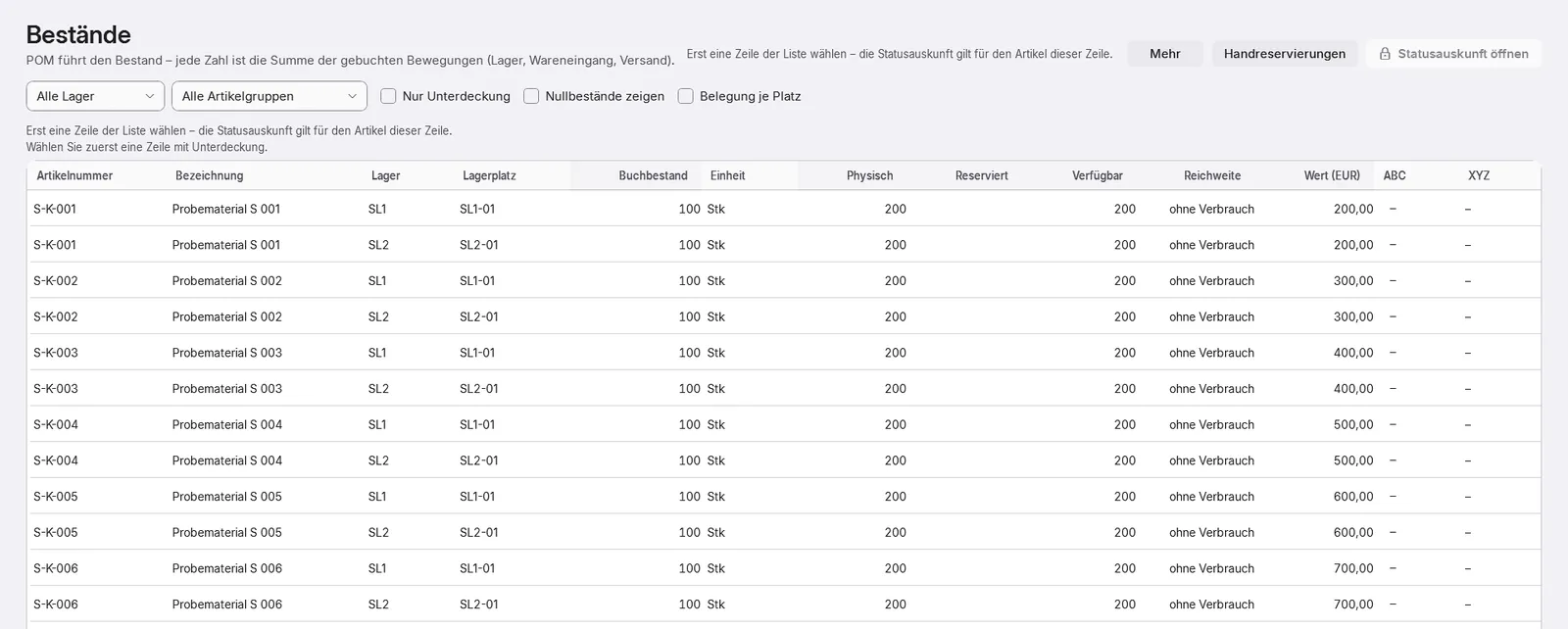
  • Basic warehouse: stores and storage locations, unchangeable stock ledger, reservations, stocktaking without shutting down operations
  • Planned From December 2026: picking and scanning in the “warehouse” device mode
  • Outgoing e-invoices: XRechnung 3.0 – POM writes the file, reads it back and checks it; a faulty file never leaves the company
  • Invoice e-mail with a ZUGFeRD PDF (PDF/A-3, profile EN 16931) if you wish – only when POM’s own check finds no error
  • Together with POM Core, the Basic package
  • Planned From December 2026: take over EDI call-offs, together with POM Integration
  • Planned No date yet: drop shipping, supplier file and supplier approval
Module page

POM Sales & CRM

Leads, enquiries, opportunities and pipeline, quote tracking, account development, forecast and marketing.

Module
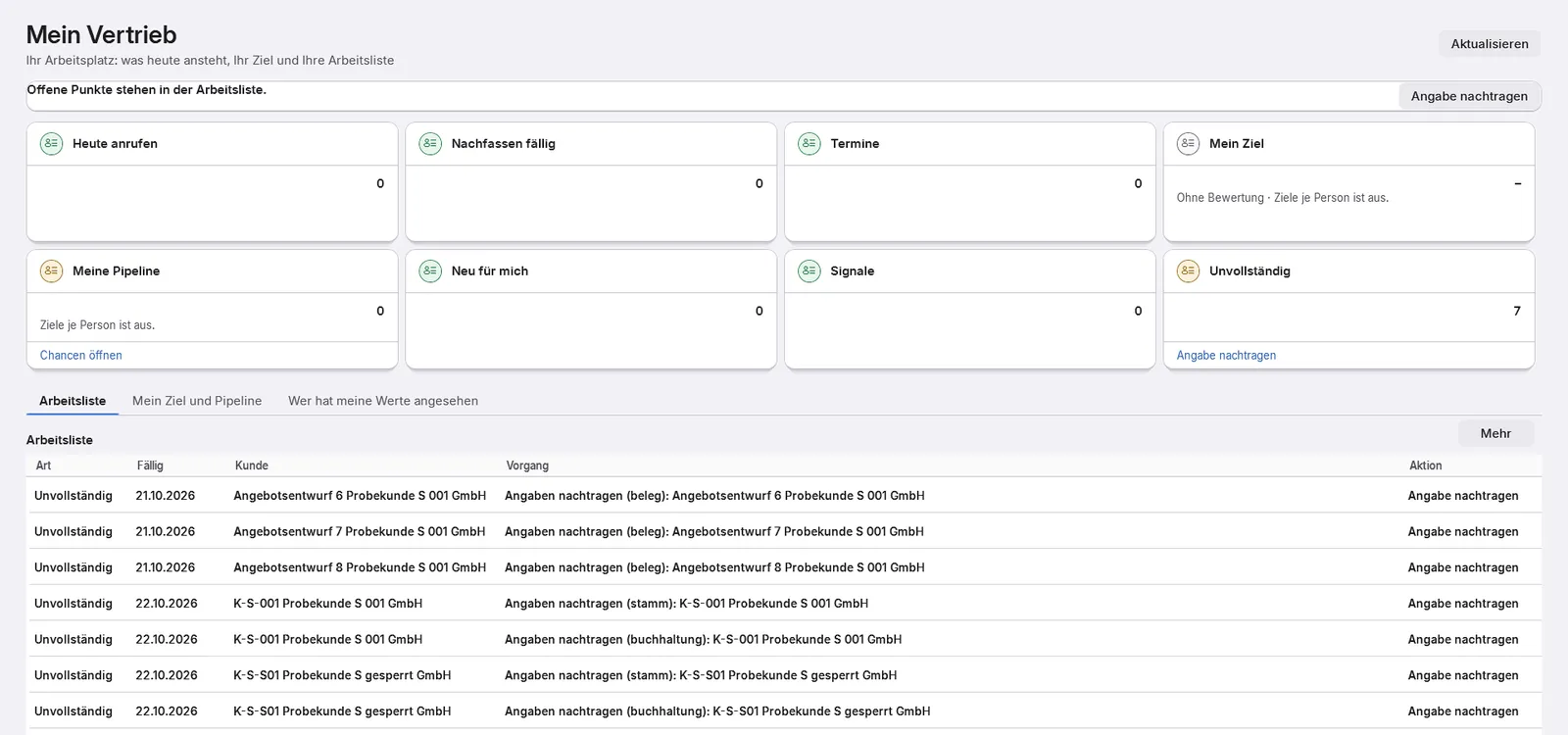
POM “My sales”: the work list of a salesperson
  • Leads in the customer master, duplicate check, conversion into an opportunity
  • Enquiries with automatic assignment and an intake task with a deadline; incoming e-mails are assigned by the inbox in the core
  • Pipeline with 15 stages; the value comes weighted from the latest quote
  • Request a costing straight from the enquiry, with a maturity check
  • Quote tracking with revisions, follow-ups and reason for loss
  • Contact journal, customer 360 view, account development with signals and “My sales” as a work list
  • Forecast with scenarios and a sales & operations preview – simulated, reserves nothing
  • Marketing with consent per channel, do-not-contact list, target groups and campaigns – off by default
  • Requires POM Warenwirtschaft – the quote is a sales document
  • Planned No date yet: project folder, budget quote, website enquiries via plug-in
Module page

POM Costing

Costing schemes, formulas, cost rates, quantity scales, scenarios and post-calculation, every price with its derivation. Plus the margin per article and customer and the answer to “Why does this article cost so much?”.

Module
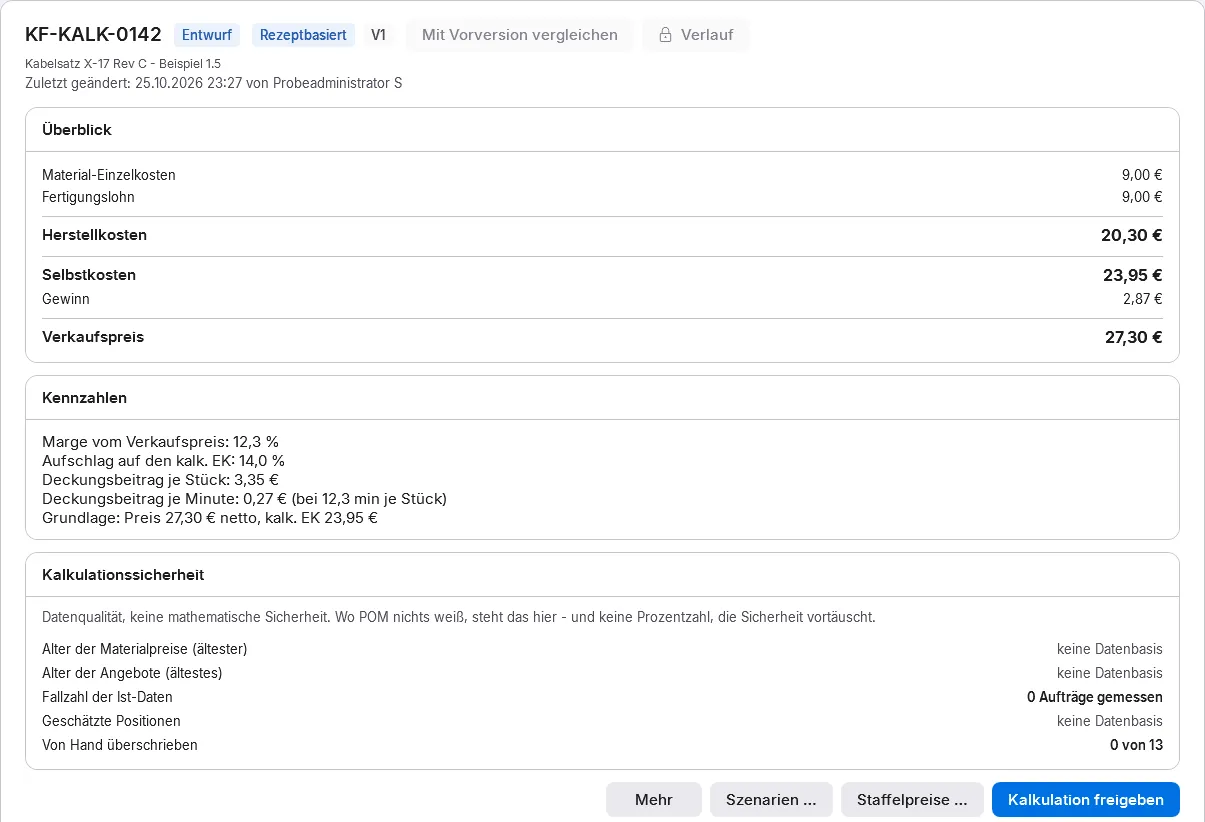
POM costing with lines and costing reliability
  • Costing schemes with lines, variables and formulas (surcharge, machine hour rate, contribution margin); factory templates
  • Every figure with its derivation, “Why this price?” in the sales document
  • Cost rates for employee, machine and cell
  • Operations with separate machine and labour times, set-up time spread over the lot size
  • Quantity scales; material with purchase prices, packaging unit and minimum quantity
  • Scenarios, target price and reverse costing – from which quantity?
  • Versions and release; collective costing per price list with “valid from”
  • Post-calculation plan versus actual with case count; costing reliability in five criteria
  • A new target time is suggested only from five feedback records – and adopted only after confirmation
  • Margin per article and customer with its history; the margin watch leads to a new costing version and prices “valid from”
  • “Why does this article cost so much?”: the costs of an article with their derivation
  • Planned No date yet: drill-down of the derivation across several levels
Module page

POM Accounting

Built-in financial accounting: chart of accounts, journal, open items, payments, dunning, cash book, closing and DATEV.

Module
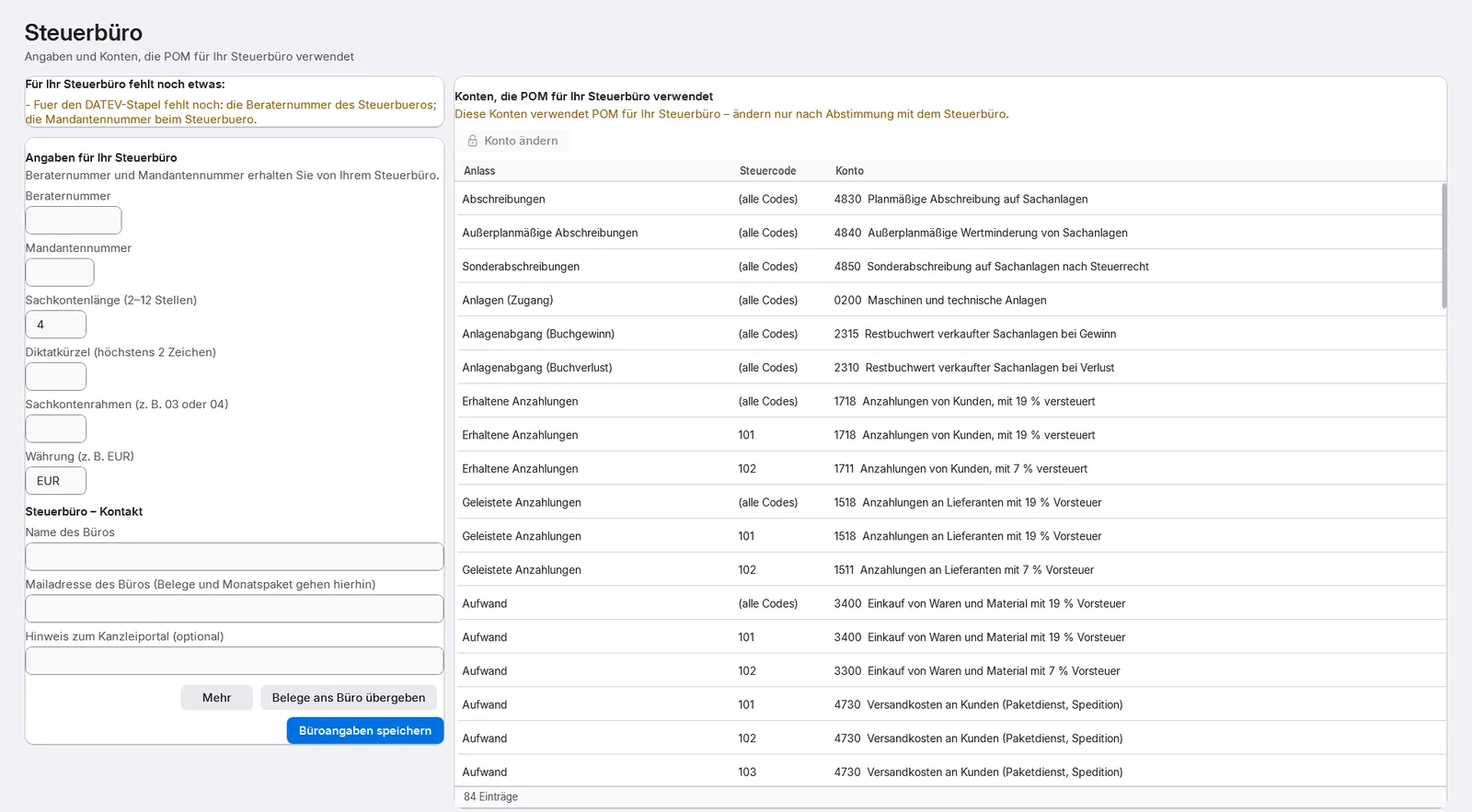
POM tax adviser screen: details for the DATEV batch and the accounts POM uses for the tax adviser
  • Double-entry bookkeeping with chart of accounts templates SKR03 and SKR04 plus templates for Austria and Switzerland; postings are only reversed, never changed
  • Automatic posting when invoices are finalised, with configurable account determination
  • Open items, cash discount, write-offs with four eyes, balance confirmation; dunning with proposal, approval and e-mail
  • Bank statement import (camt.052/.053/.054, MT940, CSV), payment proposal, payment run, SEPA direct debit
  • Cash book and cash count; the balance never goes negative
  • Month-end checklist, year-end assistant, balance sheet, P&L and management report, fixed assets, cost accounting, budget, liquidity
  • DATEV export with preview and the way back from the tax adviser; GoBD audit export
  • By default only documents go to the tax adviser until they confirm the DATEV test batch
  • German VAT return, EC sales list and e-balance sheet as calculation and form view – submission happens outside POM
  • Without this module: monthly document export to the tax adviser in the core
Module page

POM Shops & Marketplaces

Connect web shops, marketplaces, B2B portals and EDI orders: every order arrives exactly once, is checked and approved by a person (basic level).

Module
  • Sales channels: shop, marketplace, B2B portal and EDI, with a channel check before going live
  • Connectors for several widely used shop systems, marketplaces and multichannel systems, plus generic REST and webhook connections
  • Every order arrives exactly once; checks and approval by a person
  • Status, shipment and invoice reported back to the channel
  • Publishable stock with a reserve; product range and price export
  • Customer EDI (EDIFACT): orders in, confirmation, delivery advice and invoice out
  • Import assistant for historical shop data
  • Special connections on request
  • Orders by e-mail run through the inbox in the core and POM Warenwirtschaft (from December 2026), call-offs through Warenwirtschaft and Integration
  • Requires POM Warenwirtschaft and POM Integration
Module page

Logistics

POM Shipping

Shipments with several parcel services and forwarders, labels, tracking, returns, shipping e-mail and customs basics.

Module
  • Eight parcel service and forwarder connections through one shared interface
  • Shipment for the delivery note, consolidated shipment, label as a PDF or straight to the label printer
  • Tracking with journal, pick-up request, cancellation with a reason, returns
  • Shipping e-mail to the customer – as a draft or sent directly
  • Work queue “ready to ship” as a task for the person responsible
  • Shipping brake: blocked goods leave only with a special release
  • Customs basics: domestic, EU or non-EU, commercial invoice, pro forma, packing list
  • Planned No date yet: label and package actions plus factory templates for label types
Module page

POM Customs & Foreign Trade

Export control, preference and origin, export process with commercial invoice and packing list. No official customs declaration.

Module
  • Export control as a check: country, recipient, end user, dual use, licences
  • Preference and origin on the article in seven states, supplier declarations, preference calculation across the bill of materials
  • Export process with commercial invoice, pro forma and packing list; POM recognises domestic, EU or non-EU itself
  • Shipping block when customs data is missing, with a jump to where it is entered
  • Requires POM Shipping
  • Planned From December 2026: sanctions screening of the parties; you import the EU financial sanctions list as a file
Module page

POM Warehouse Logistics

Site layout editor, warehouse map, pick route, handling units, container account and kanban; storage optimisation from December 2026.

Module
POM stock per warehouse and storage location with book stock, physical, reserved and available
  • Site layout per hall with editor: halls, aisles, gates, machines, racks, locations
  • 2.5D warehouse map – one layout with two views, hall and warehouse
  • Pick route over the path graph with its calculation shown; blocked aisles are avoided
  • Handling units (pallet, container, article or batch), switchable per warehouse
  • Container account for empties per customer and supplier, with a reclaim task
  • Internal replenishment: kanban, two-bin system, material call by scan
  • Requires POM Warenwirtschaft
  • Planned From December 2026: storage optimisation with relocation proposals (a person decides) and scanning in the “warehouse” device mode
  • Planned No date yet: offline booking on the scanner and an app of its own
Module page

Production

POM Shop Floor Data

Shop floor data capture at the terminal: log on and off production orders, times, quantities, scrap and downtime reasons.

Module
POM shop floor terminal with fields for production order, personnel number, workstation, tool, process step and batch
  • Scan, start, stop: order and personnel number, optionally operation, workstation, tool and batch
  • Stop with finished quantity, progress, break or wrong booking; scrap and rework with a mandatory reason, downtime reasons from a catalogue
  • Planned From December 2026: scrap log: scrap with reason and quantity, analysed in POM Quality
  • Checks before the start in plain language: blocked, qualification, absence, calibration, batch requirement
  • A disruption or missing quantity becomes a task for the person responsible, due by end of shift
  • If the network fails, the terminal keeps booking and sends later; duplicates are recognised
  • Downtime alert; evaluations by workstation, tool, order and shift
  • Order analysis target versus actual, marked as preliminary
  • Label printing at the terminal; the batch scan writes into traceability
  • Planned No date yet: OEE in shop floor data, loss cascade and plan-versus-actual Gantt
Module page

POM Machines & Maintenance

Plans the machines: machines, tools and gauges with maintenance and calibration history, due dates and locks. From December 2026: machine per operation, workload and weekly plan per machine.

Module
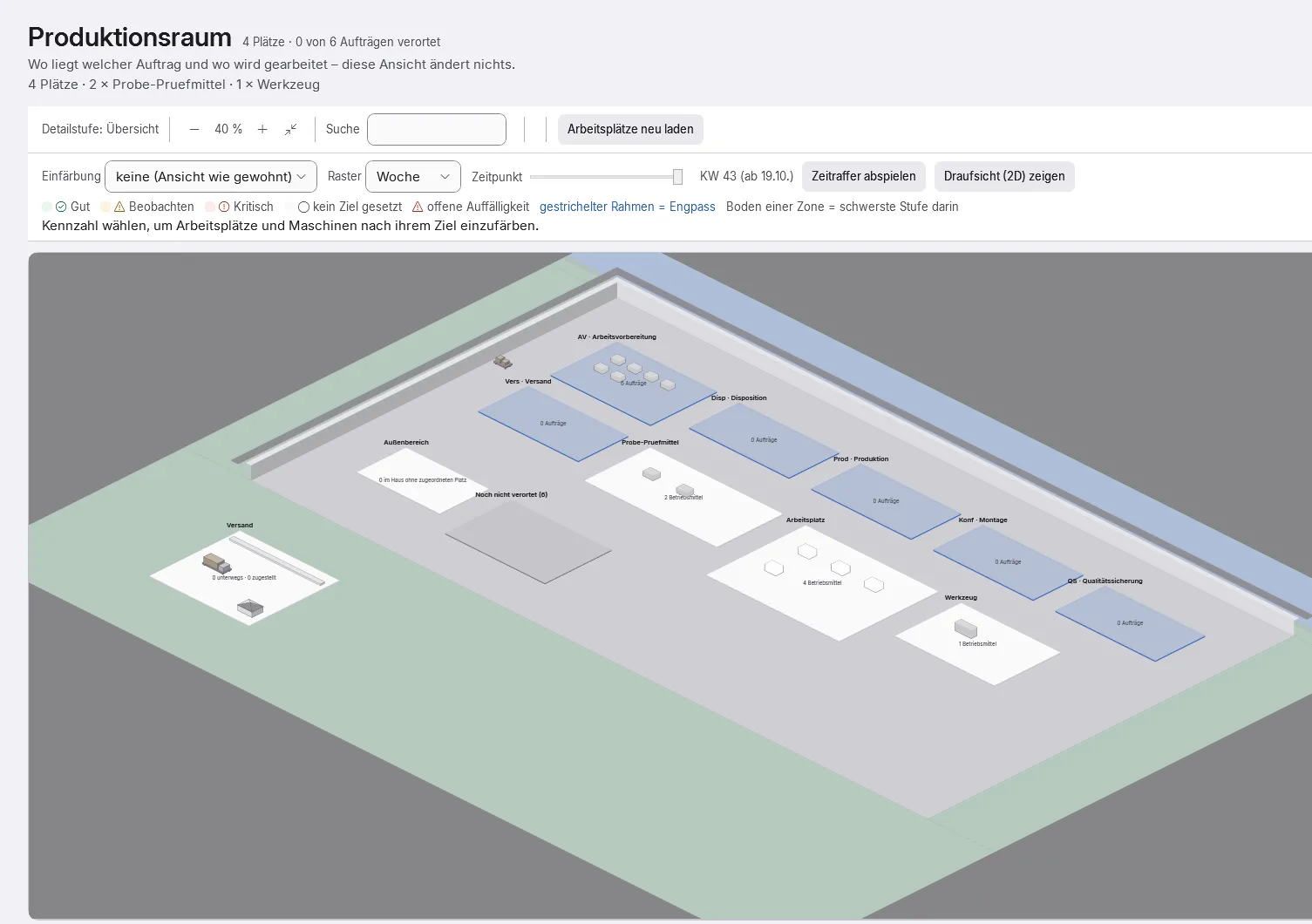
POM production space: hall view with areas, workstations and equipment
  • One register for workstations, machines, lines, tools, gauges, fixtures and vehicles
  • Maintenance and calibration history; the next date is calculated from the history, calibration entries cannot be changed
  • Calibration requirement per equipment type: notice or refuse the booking
  • Locks with a reason, release with history; due list with notices in planning, at the terminal and in “Today”
  • A disruption at the terminal becomes a task with a proposed lock; pre-planning checks maintenance and calibration before use
  • Qualification requirement per asset, documents with expiry date, cost information, transfer to other sites
  • Planning board rows and staff suggestions per asset, hall view
  • Without this module the machine register in the core is read-only
  • Planned From December 2026: machine per operation, one person running several machines, workload and “next up” per machine, a weekly plan per machine to post
  • Planned No date yet: maintenance log with plans by meter reading, maintenance orders with a result per step, spare part withdrawal and statutory inspection types
  • Planned No date yet: calibration certificate with measuring points, gauge issue and MSA
Module page

POM Subcontracting

From December 2026: outsource operations to suppliers, external work with provided material, return delivery and incoming inspection.

Module
  • Planned From December 2026: External operation on the production order, as an external-work purchase order or as a simple process
  • Planned From December 2026: Material provision with a provision note, also as a PDF, and a provision proposal
  • Planned From December 2026: Book the return delivery, with incoming inspection
  • Planned From December 2026: Material balance per assignment: target from the bill of materials against issued and returned
  • Planned From December 2026: A difference is resolved as a task
  • Planned From December 2026: Report back or cancel the process; screen with status and main action
Module page

POM MES Cable Assembly

MES for cable assembly: machines with capabilities, control station with set-up optimisation and OEE. In development, expected from January 2027.

In development – expected January 2027
  • Planned Expected January 2027: cable assembly catalogues – wires, terminals, seals, tools and applicators, crimp standards
  • Planned Expected January 2027: machines with capabilities and limits: “Which machine can make this part?” with the reason
  • Planned Expected January 2027: versioned production plans with operations, dependencies and automatic release
  • Planned Expected January 2027: control station with set-up-optimised sequence per machine and a preview before adoption
  • Planned Expected January 2027: feedback with good quantity and scrap, OEE per machine, tool passport, material batches
  • Planned Expected January 2027: machine client at the workstation; reporting service with a local buffer
  • Planned Expected January 2027: builds on POM Shop Floor Data and POM Machines & Maintenance
  • Planned Expected early 2027: MES Universal for any production without an industry-specific MES; later, no date yet: MES for machining
Module page

Quality

POM Quality

Inspection plans with characteristics and limits, tamper-proof measured values, quality blocks, incoming inspection, gauges and quality key figures. From December 2026 also the scrap log with analysis by reason.

Module
  • Inspection plans with versions and characteristics – dimension, attribute, visual, function, document – with limits and sampling instruction
  • Assignment per article and process step, at goods receipt too
  • Inspection records cannot be changed; pass or fail is decided by the server, corrections only as a replacement record with a reason
  • Quality block with reason, quantity and type of release: fixed, special release or scrap
  • Incoming inspection: goods go to blocked stock automatically, release under the four-eyes principle; a supplier first article is recognised
  • Gauges: overdue calibration is noted permanently, the backward report answers “What was it measured with?”
  • Import test device files (CSV) instead of retyping; inspection report as print or CSV
  • Key figures: inspection rate, inspection scrap rate, first-article rejection rate
  • Planned From December 2026: scrap log with analysis by reason, scrap recorded at the terminal with POM Shop Floor Data
  • Without this module, POM asks QA for substitute evidence – an inspection never silently disappears
  • Planned No date yet: FMEA, control plan, audits, document control and SPC charts are being built
Module page

POM Complaints

Customer, internal and supplier complaints, 8D report, root cause analysis, actions, rework and costs.

Module
  • Customer, internal and supplier complaint in one screen, even without a production order – from delivery note, invoice or customer
  • Central follow-up path with hand-overs to work preparation, warehouse, accounting and dispatch
  • 8D report (D1–D8), switchable; closing only with D4 to D6
  • Root cause analysis with 5 Why and Ishikawa (6M)
  • Actions with effectiveness check; rework resets the process steps
  • Complaint costs created automatically from credit note, replacement order, freight, inspection time and recharging
  • Assessment with accepted quantity and causer, fault reason evaluation, key figures; links to inspection record, block and batch
  • Planned No date yet: interim reply and 8D cover e-mail to the customer
Module page

POM Traceability

Batches and serial numbers forwards and backwards, affected-items list for recalls, gap report and evidence package.

Module
  • Forwards (“Where did this batch go?”) and backwards (“What was this piece made from?”), across several levels
  • Tracking level per article: none, order, batch or serial number; introduction with a cut-off date possible
  • Affected-items list for a recall, down to the customer
  • Gap report “Where is the trail missing?” – before an audit, for example
  • The trail cannot be changed; cancellation only as a counter-booking with a reason
  • Block and release batches with separate permissions; a blocked batch stops dispatch
  • Batch capture with FIFO proposal, GS1 scan, serial numbers at goods receipt
  • Retention periods per type of evidence; evidence package with an issue log
  • Planned No date yet: blocking logic for the best-before date – today it is recorded
Module page

People

POM Time Recording

Clock in and out at the terminal, target versus actual, time accounts, corrections, monthly closing, with holiday calendar and leave requests; from December 2026 also leave entitlement calculation.

Module
  • Clocking in and out with a badge (RFID) at the terminal; buffered if the server fails
  • At the terminal only one’s own data: day, month, account, remaining leave – requests right there
  • A forgotten clock-out stays open – POM does not invent time
  • Working time profiles with core time and break rules, shift models, shift plan, supplements
  • Flexitime and other time accounts; payout with approval
  • Correction requests with an approval path of up to three levels; nobody approves their own request
  • Holiday calendar and leave requests with approval; approved absence takes effect at once in the planning board, capacity and deputies
  • Monthly closing freezes the figures; wage types and a hand-over file for payroll – POM does not run payroll
  • Planned From December 2026: Leave entitlement calculated with the rules of the German Federal Leave Act as the default, statutory and contractual leave kept apart, adjustable per company
  • Planned From December 2026: Leave account with remaining leave, carry-over and a notice before leave lapses; on leaving, remaining leave, payment in lieu and time balance as a proposal
  • Planned From December 2026: Leave certificate on leaving; leave taken with a previous employer is credited
  • Planned From December 2026: Notice “time account meets workload”: POM shows when a positive time balance fits quiet weeks in the area – at no extra charge
  • Planned No date yet: working time act monitor, working time record to post, and “My figures”
Module page

POM Piecework Pay

Piecework and homework: piece rates, monthly list per employee and hand-over to payroll.

Module
  • Monthly list per employee with wage lines and additional items
  • Piece rates with validity and quantity scales; the valid rate is suggested
  • Homework: assignment per work step and partial quantity, report back, check; return monitoring with deadlines
  • Corrections with a correction document instead of silent changes
  • Monthly closing with carry-over; hand-over to payroll
  • Earnings are visible only with a dedicated permission
  • Planned No date yet: pay register under the German Homework Act and a “piecework below minimum wage” monitor
Module page

POM HR

Guided joining and leaving with tasks for everyone involved, application to hiring, contracts and changes and smart staff planning that makes proposals week by week.

Module
  • Planned From December 2026: Assistants for joining, changes from a date and leaving – a few entries, then confirm
  • Planned From December 2026: A process per joiner and leaver with tasks for HR, IT, supervisors and payroll; the type of leaving decides which tasks are created
  • Planned From December 2026: Open work handed over to the deputy; on the effective date POM switches badge, cover and planning itself
  • Planned From December 2026: Fixed terms and probation with a notice before they end; rejoining with the existing identity
  • Planned From December 2026: On leaving, the process does the maths: remaining leave, payment in lieu and time balance as a proposal for decision
  • Planned From December 2026: Application to hiring: staffing needs, applications, interviews with decisions made by people, hiring assistant with preview
  • Planned From December 2026: Contracts and change requests with an approval path and impact check; whoever requests does not approve
  • Planned From December 2026: Smart staff planning: every week, the coming workload per area and skill against available hours and time accounts
  • Planned From December 2026: Proposals with reasons – reduce overtime, time off in lieu, extra hours, bring leave forward; a person confirms, the employee agrees
  • Planned From December 2026: Rules adjustable, with factory defaults; a switch for works council involvement
  • Planned From December 2026: Self-service for employees without a licence of their own: own data, requests and consent to proposals
Module page

Analyse

POM Analytics

Statistics, on-time delivery, key figures per area, cockpits and exports, with a drill-down to the individual document.

Module
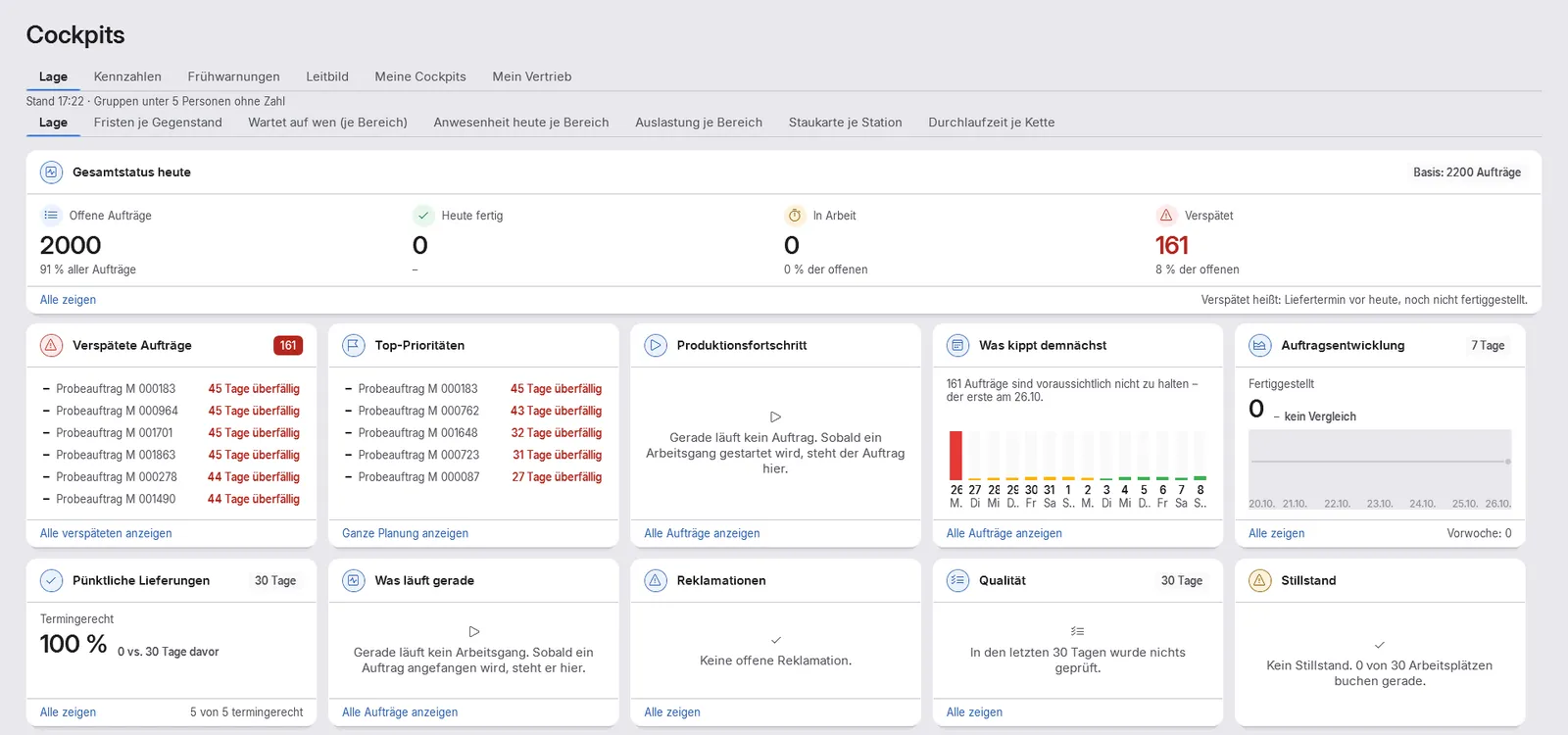
POM “Situation” cockpit with key figures of the business
  • Key figure register on the server: screen, cockpit and export show the same number
  • Statistics with a time axis – previous year, plan or target, rolling twelve months – and group analysis
  • Document path: open every tile down to the single document
  • On-time delivery, key figures per area and statistics exports
  • “Situation” cockpit with deadlines, waiting times, workload and lead time; targets, views and cockpits per person and area
  • Nightly check for outliers and trends with “Why?” against the previous period or year – statistical, not AI, never about individuals; partly built
  • Consolidation across companies, together with POM Multi-Company
  • Area key figures, ABC/XYZ and lead times are available in the core even without this module
  • Planned No date yet: what-if as well as Excel and print output on every table
Module page

Connect

POM Intelligence

Connects external AI programs inside the company network: read, draft and propose only; a person always approves. Off by default, enabled per company, second factor.

Module
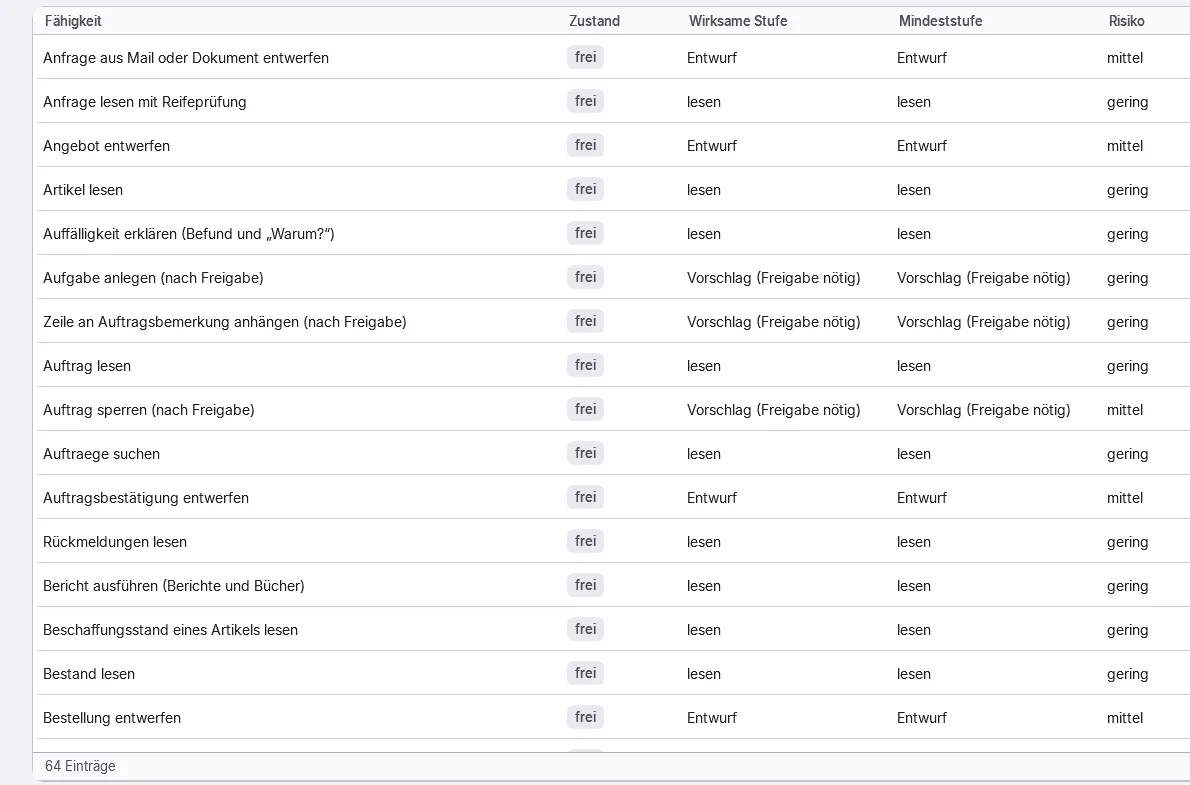
POM Intelligence: capabilities of the AI assistant with level read, draft or proposal with approval, and risk
  • AI interface (MCP): external AI programs inside the company network – read, draft and propose only
  • A person in the POM workstation always approves
  • Off by default; enabled per company, approval per program, sign-in with a second factor
  • Personnel and employee data are blocked for external AI by default
  • Charged per access, i.e. per approved AI program – not per user
  • AI assistant in pilot operation: answers from your own data with sources – local, without network and without a graphics card
  • AI assistant: drafts without effect, for a quote or purchase order for example, that a person approves
  • Never more permissions than the person the AI works for; emergency stop globally, per company and per tool
  • Technically blocked: performance and behaviour rating, rankings of people, emotion recognition, covert monitoring
  • POM runs fully without AI
Module page

POM Integration

Connections to other ERP, MES and warehouse systems: file, REST and CSV with field mapping, synchronisation and log.

Module
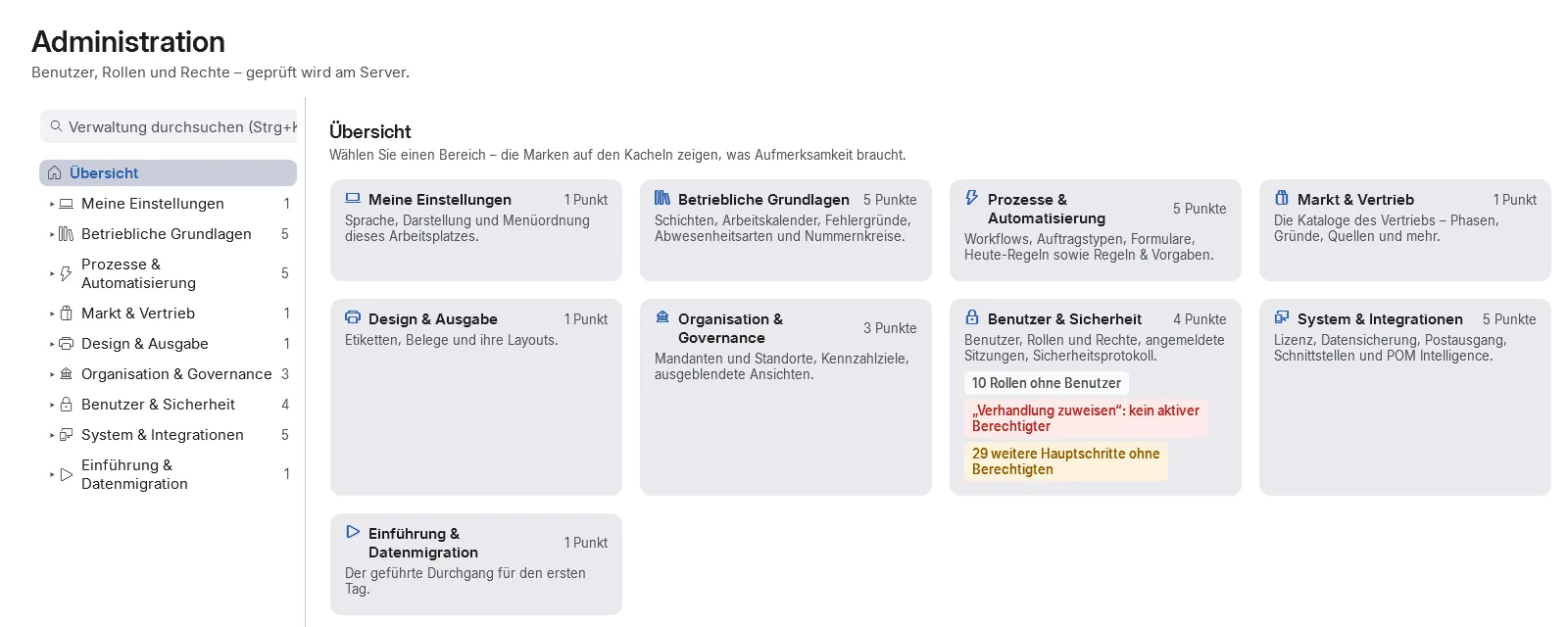
POM administration: overview of the areas, including system & integrations
  • Connections for import, export or both – to ERP, MES, machine and warehouse systems and to file stores
  • File connector (CSV and Excel) and REST/JSON connector, with templates
  • Field mapping with leadership per field
  • Preview first, then synchronise; faulty records retried one by one, a monitor shows runs and records
  • Way back to the external system: completion reports, stock movements, scrap; collection at intervals
  • Access data encrypted, with rotation and expiry
  • Settings under administration, without a menu item of their own
  • Planned No date yet: customer API
Module page

Company

POM Multi-Company

Several companies in one installation, cleanly separated, no company sees another one’s data.

Module
  • Several legally independent companies in one installation, cleanly separated
  • Company groups with inherited settings; switching companies without a new sign-in
  • Invoice sender per document profile
  • Process across company lines: a purchase order in company A becomes a customer order in company B (first stage)
  • Consolidated evaluation with POM Analytics; intercompany balances per pair of companies with POM Accounting
  • The first company is included in the core; bookable independently of POM Multi-Site
  • Planned No date yet: shared services, central user administration across companies, transfer prices and modules per company
Module page

POM Multi-Site

Further sites of the same company with their own stock, workstations, calendars and holiday schemes.

Module
  • Further plants with their own stock, books, resources and calendars
  • Proposals, capacity and shop floor data per plant
  • Transfer an order to another site; one order across two plants with a location per work step
  • Transit warehouse with receipt at the destination and transit watch
  • Settings, print templates, customs details and shipping e-mail per site
  • Permissions scoped per site
  • The first site is included in the core; POM Multi-Company is not required
  • Planned No date yet: transfers between sites via a transit order with stocktaking and batch
Module page

Across all modules

  • Document and label designer – Templates for documents and labels with versions, letterhead, custom fields and formula fields. Labels go to the label printer as ZPL, with barcodes such as Code 128, DataMatrix, QR and GS1.
  • E-invoicing – POM writes the XRechnung from the finalised invoice, reads it back and checks it, a file with errors does not leave the building. On request the invoice e-mail contains a ZUGFeRD PDF. Incoming invoices are read in via XRechnung import.
  • Accounting with DATEV – Your own financial accounting in POM or bookkeeping by your tax adviser: DATEV export with preview and a return path from the adviser. The firm gets a role that can only view and export.
  • Time recording and piecework pay – Clock in and out at the terminal, time accounts, leave requests with approval; piecework and homework with a monthly list per employee. POM prepares the figures and hands them to payroll, it does not run payroll itself.
  • Roles and permissions – Role templates, freely editable and renamable. One level switch per area, plus the permission simulation “What would POM look like for X?”. The server checks permission, module and company on every access.
  • System health – POM regularly checks disk, database, backup, access, licence, mail, printing and services. Every finding names the cause, the next step and who is responsible; a red finding becomes a task for administration.
  • Eleven languages, light and dark – Each user picks one of eleven languages; documents are printed in the recipient’s language. Light and dark themes, device modes for shop floor terminal and time clock. From December 2026 you also get F1 help for every screen and the “warehouse” device mode.
  • Companies and sites – The company is the security boundary: no company sees another one’s data. Sites organise plants with their own stock and calendars. The first company and the first site are free in the core.
  • POM IntelligencePilot operation – Local AI assistant, clearly marked: answers from your data with sources, drafts that a person approves. It never gets more permissions than the person it works for. POM runs fully without AI.

How the modules work together

Your function not listed?

Ask us. Some things have a different name in POM, some can be set with operating rules and improvements that make POM better for everyone we build in at no extra charge.